

Tracking Extension Benefits
The Magebit Tracking Extension enhances your analytics capabilities by enabling server-side tagging, ensuring more accurate data collection, improved website performance, and enhanced user privacy.
Overview
The Tracking Extension provides comprehensive analytics solutions that address common challenges in client-side tracking, offering improved performance, accuracy, and privacy compliance for modern e-commerce websites.
Why Use Analytics?
Analytics play a crucial role in understanding user behavior, optimizing marketing efforts, and improving overall website performance. With tools like Google Analytics 4 (GA4), Google Ads, and other measurement protocols, you gain valuable insights into how visitors interact with your site, which pages perform best, and where potential customers drop off.
Key Benefits of Analytics
Track Website Traffic: See how many users visit your site, where they come from, and how they navigate through it.
Improve User Experience: Identify pain points in the user journey and optimize pages for better engagement.
Enhance Marketing Strategies: Measure campaign effectiveness, allocate budgets efficiently, and target the right audience.
Boost Conversions: Understand what drives sales or sign-ups and optimize accordingly.
Data-Driven Decisions: Without analytics, businesses make decisions blindly. Implementing robust tracking ensures you stay competitive, adapt to changing trends, and make data-driven choices that drive growth.
Client-Side vs Server-Side Tagging
Server-Side Tracking
Pros
High Accuracy: Server-side tracking is more precise than client-side tracking. Accuracy depends on setup but generally ranges from 70% to 90%, while our current projects reach 90%+ accuracy.
First-Party Data Benefits: Since tracking runs on the server, it reduces reliance on third-party cookies, which improves data reliability and compliance with privacy regulations.
Better Performance: Server-side tracking reduces page load times, as less data is loaded in the browser.
Cons
Requires Server Setup: You need to set up and maintain a server-side GTM service runner on your infrastructure.
Alternative Service Option: Alternatively, you can subscribe to a third-party service like Stape:
- ~$50/month for 2M event calls
- ~$20/month for 500K event calls
Client-Side Tagging
Pros
No Server Setup Required: Tracking works directly in the browser.
Easier Implementation: Easier to implement and maintain.
Cons
Ad Blocker Vulnerability: Data can be blocked by ad blockers, leading to lower tracking accuracy.
Third-Party Cookie Dependency: Uses third-party cookies, which may be restricted by browsers over time.
Key Differences
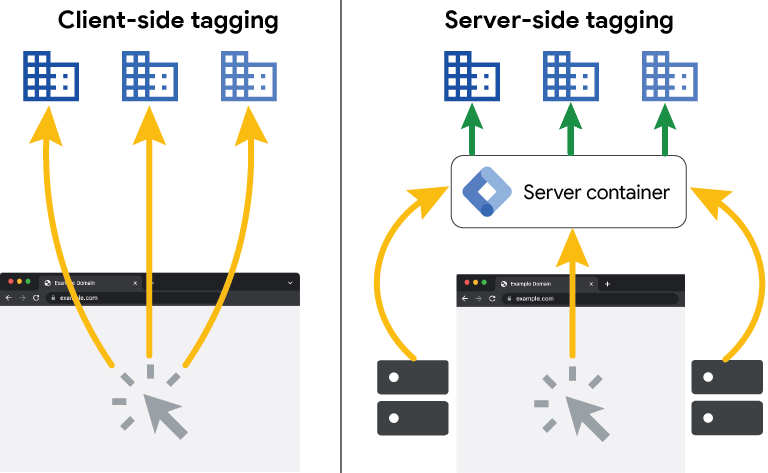
The primary distinction between client-side and server-side tagging lies in how tracking data is collected and sent to various measurement protocols like GA4, Meta Pixel, and Twitter Pixel.
Client-Side Tagging: Tracking tags run directly in the user's browser, making individual requests to analytics and ad platforms.
Server-Side Tagging: Data is sent to a dedicated tagging server first, which then processes and distributes it to the necessary measurement protocols.
Impact on Website Performance
Client-Side Tagging Performance Issues
With client-side tagging, multiple tracking scripts load on the website, increasing page load time and affecting user experience. Each tag requires its own request, which slows down the website and may lead to higher bounce rates.
Server-Side Tagging Performance Benefits
Server-side tagging reduces this load by handling tracking requests on a separate server. This results in faster page speed, improved user experience, and reduced strain on the client's browser.
Dealing with Ad Blockers and Privacy Restrictions
Client-Side Tagging Limitations
One major drawback of client-side tagging is that ad blockers and browser restrictions (like Safari's ITP or Firefox's ETP) can block tracking requests, leading to incomplete or inaccurate data collection.
Server-Side Tagging Advantages
With server-side tagging, tracking requests are sent to a first-party server (rather than directly to third-party platforms), making them less likely to be blocked. This improves data reliability while still respecting user privacy regulations like GDPR.
Example Scenario
Imagine a website using multiple analytics tools like GA4, Meta Pixel, and Twitter Pixel:
Client-Side Tagging: The website sends three separate requests—one for each measurement protocol—directly from the user's browser. This slows down performance and increases the risk of data loss due to ad blockers.
Server-Side Tagging: The website sends a single request to a dedicated tagging server, which then processes and distributes the data accordingly. This leads to faster performance, more accurate tracking, and reduced data loss.
Magebit Tracking Extension
The Magebit Tracking Extension was designed to address the common challenges of client-side tagging, providing a more reliable and efficient tracking solution.
Common Business Issues
Data Loss Due to Ad Blockers: Up to 20% of tracking data can be blocked, leading to inaccurate reports and reduced conversions.
Buggy Event Tracking: Errors in event data can result in missing or inaccurate events, affecting campaign optimization.
Google Ads Tracking Failures: Poor data accuracy can lead to misattributed conversions or even broken ad tracking.
Website Performance Issues: Loading multiple client-side tracking tags can slow down the site, negatively impacting user experience and SEO.
Solution Benefits
The Magebit Tracking Extension provides a robust, server-side tagging solution for Magento 2 (Hyvä), ensuring:
- Faster Performance - Reduced page load times
- Improved Data Accuracy - 90%+ tracking accuracy
- Better Ad Tracking - Enhanced Google Ads performance
- Ad Blocker Resistance - Minimized impact of ad blockers
- Out-of-the-Box Solution - Simplified implementation
This solution allows businesses to focus on growth while maintaining reliable analytics.
Side-by-Side Comparison
Magebit Tracking Extension vs Regular Client-Side Tagging
Performance:
- Magebit Extension: Faster page load times, reduced client-side scripts
- Client-Side: Multiple scripts slow down website performance
Accuracy:
- Magebit Extension: 90%+ tracking accuracy
- Client-Side: 70-80% accuracy due to ad blockers
Ad Blocker Resistance:
- Magebit Extension: First-party data collection, harder to block
- Client-Side: Vulnerable to ad blockers and browser restrictions
Privacy Compliance:
- Magebit Extension: Better GDPR compliance, first-party data
- Client-Side: Relies on third-party cookies, privacy concerns
Implementation:
- Magebit Extension: Out-of-the-box solution for Magento 2
- Client-Side: Requires custom implementation and maintenance
Multi-Platform Support:
- Magebit Extension: Single server handles multiple measurement protocols
- Client-Side: Separate implementations for each platform
Maintenance:
- Magebit Extension: Centralized configuration and management
- Client-Side: Multiple configurations to maintain