

Image Resizer Extension
The Image Resizer resizes, crops and converts images at render time. A template asks a view model for the size it needs; the module writes the file into pub/media/image_resizer/cache, stores the path in Magento cache and returns a URL. The size comes from a view.xml image role, from the call itself, or from both, with the call winning.
On top of single files it builds the responsive <picture> markup a theme needs: one source per breakpoint tier, WebP and optionally AVIF conversions, retina candidates, and a CLI command that generates all of it before the first visitor asks for it.
See the options rendered
The Style Guide extension has a page that renders each of these options applied to a real image, which is quicker than reasoning about them from the API.
What it does
- Image sources - files under
pub/media, and assets in a module'swebdirectory - Sizing - width, height, or either one alone, with control over aspect ratio, upscaling and framing
- Cropping -
object_fit_cover, which behaves like the CSSobject-fit: coverproperty - Format conversion - WebP always, AVIF when enabled, each with its own quality setting
- Responsive markup -
<picture>output, or the same data as an array for client-side rebuilds - Transformations - rotation, background colour, transparency and watermarks
- Fallbacks - a placeholder image when the source file is missing
- Pregeneration - a CLI command that warms every registered image source, inline or through the queue
Installation
Install the Image Resizer extension using Composer.
Installation Command:
composer require magebitcom/magento2-image-resizerPost-Installation Steps:
bin/magento setup:upgradeUsage
View Models
The extension exposes two view models:
ImageResizer: The entry point for everyday use. It carries the whole API: sizing, format conversion, responsive markup and the transformations below.
CategoryImageResizer: Extends ImageResizer with methods that take category-specific parameters, so a template does not have to look the image attribute up itself.
Basic Usage
File Path Formats: File paths can be specified in two formats:
- Pub Media Path:
style-guide/test1.jpg- located inpub/media/style-guide/test1.jpg - Module Asset:
Magebit_StyleGuide::images/test1.jpg- located in module's web directory
Basic Resizing Examples:
Image from pub/media directory:
<?php
$imageResizerViewModel = $viewModels->require(ImageResizer::class);
?>
<img src="<?= $escaper->escapeUrl($imageResizerViewModel
    ->init('style-guide/test1.jpg')
    ->resize(400, 200)
    ->getUrl()) ?>"/>
Image from module asset:
<?php
$imageResizerViewModel = $viewModels->require(ImageResizer::class);
?>
<img src="<?= $escaper->escapeUrl($imageResizerViewModel
    ->init('Magebit_StyleGuide::images/test1.jpg')
    ->resize(400, 200)
    ->getUrl()) ?>"/>
Flexible Resizing (width or height only):
<?php
$imageResizerViewModel = $viewModels->require(ImageResizer::class);
?>
<!-- Height only (width will match) -->
<img src="<?= $escaper->escapeUrl($imageResizerViewModel
    ->init('Magebit_StyleGuide::images/test2.jpg')
    ->resize(height: 200)
    ->getUrl()) ?>"/>

<!-- Width only (height will match) -->
<img src="<?= $escaper->escapeUrl($imageResizerViewModel
    ->init('Magebit_StyleGuide::images/test2.jpg')
    ->resize(width: 200)
    ->getUrl()) ?>"/>
Category Image Usage
Use the specialized CategoryImageResizer for category-specific image processing:
<?php
$categoryImageResizerViewModel = $viewModels->require(CategoryImageResizer::class);
?>
<img src="<?= $categoryImageResizerViewModel
   ->category(20)
   ->resize(300, 200)
   ->keepFrame(true)
   ->getUrl(); ?>"/>
Category Method Parameters:
int|CategoryInterface $category- Category ID or category modelstring $imageAttribute- Image attribute (default: image)string $imageId- Image IDarray $attributes- Additional attributes
Responsive Picture Generation
Generate responsive picture tags with sources for Desktop and Mobile using getResponsivePicture:
<?php
$imageResizerViewModel = $viewModels->require(ImageResizer::class);
?>
<?= $imageResizerViewModel
    ->constrainOnly(false)
    ->keepAspectRatio(false)
    ->keepFrame(false)
    ->getResponsivePicture(
        $block->getImagePath(),
        null,
        [
            'alt' => $escaper->escapeHtmlAttr($category->getName()),
            'aria-label' => $escaper->escapeHtmlAttr($category->getName()),
            'class' => 'hidden lg:block image object-cover',
            'picture_class' => 'flex'
        ],
        'category_block_list_widget',
        ['width' => 170, 'height' => 120],
        null
    ); ?>
Responsive Picture Features:
- Generates WebP sources for each tier, plus AVIF sources when AVIF output is enabled
- Serves the original format (JPEG/PNG) only through the
<img>fallback, which carries the same candidates - Every source carries a 1x candidate and one per configured retina ratio, described by pixel density; see width descriptors for the
wform and when density is the wrong tool - Automatically adds
_mobilesuffix for mobile image IDs - Uses desktop path for mobile if mobile path not provided
- Generates mobile sources only if size differs
Responsive Picture with ImageId
Using ImageId from view.xml:
<?php
$imageResizerViewModel = $viewModels->require(ImageResizer::class);
?>
<?= $imageResizerViewModel
    ->keepAspectRatio(false)
    ->constrainOnly(true)
    ->backgroundColor([0, 0, 0])
    ->getResponsivePicture(
        "Magebit_StyleGuide::images/test2.jpg", // Desktop image
        "Magebit_StyleGuide::images/test1.jpg", // Mobile image
        ['class' => 'mt-5'], // HTML attributes
        'category_block_list_widget' // ImageId from view.xml
    ); ?>
Without Mobile Image (Single Version):
<?php
$imageResizerViewModel = $viewModels->require(ImageResizer::class);
?>
<?= $imageResizerViewModel
    ->keepAspectRatio(false)
    ->constrainOnly(true)
    ->backgroundColor([0, 0, 0])
    ->getResponsivePicture(
        "Magebit_StyleGuide::images/test2.jpg", // Desktop image
        null, // No mobile image
        ['class' => 'mt-5'], // HTML attributes
        null, // No imageId
        ['width' => 768, 'height' => 480] // Custom dimensions
    ); ?>
Tablet tier and custom breakpoints
Image Resizer 0.1.14
The tablet tier, configurable breakpoints, and getResponsiveSources() below ship in Image Resizer 0.1.14, the version bundled with Venta 1.6.4.
getResponsivePicture() accepts optional trailing parameters for a third (tablet) tier and custom breakpoints:
?string $tabletUrland?array $tabletSizeadd a tablet<source>between mobile and desktop. When only a size or a_tabletimage id is given, the desktop URL is reused.- A matching
_tabletimage id inview.xmlis resolved automatically, in the same way_mobilealready is. int $mobileMaxWidth(default767) andint $tabletMaxWidth(default1024) set the breakpoints, so they are no longer fixed.int $mobileMinWidthandint $tabletMinWidth(default0) make a tier use a rangedmin-width/max-widthmedia query when set above zero. Tiers render narrowest first.
Responsive sources for client-side rebuilds
getResponsiveSources() returns the same responsive data as a structured array instead of HTML, so a script can rebuild the mobile/tablet/desktop sources on the client (for example after a swatch swap):
$sources = $imageResizerViewModel
    ->getResponsiveSources(
        'Magebit_StyleGuide::images/test2.jpg', // image path
        'product_card',                          // imageId from view.xml (uses its _mobile / _tablet variants)
        ['width' => 288, 'height' => 288]        // desktop size
    );
// [
//   'sources' => [ ['media' => ..., 'type' => ..., 'srcset' => ..., 'width' => ..., 'height' => ...], ... ],
//   'img'     => ['src' => ..., 'width' => ..., 'height' => ...],
// ]
It derives the mobile and tablet tiers from the image id's _mobile / _tablet variants and takes the same breakpoint parameters as getResponsivePicture(). The isObjectFitCover() accessor reports whether the store crops images to fill by default (the object_fit_cover setting), which is useful when deciding how to render a rebuilt source.
Retina ratios
Image Resizer 0.2.0
The ratio set is admin-configurable from Image Resizer 0.2.0. Earlier versions wrote one 2x variant and nothing else.
Every rendition gets one scaled variant per row of Retina Ratios, the table under Stores > Configuration > Advanced > System > Images Upload Configuration, for as long as Generate Retina Images is on. The table ships with a single 2, so a store that never opens it keeps the output earlier versions wrote, down to the file paths.
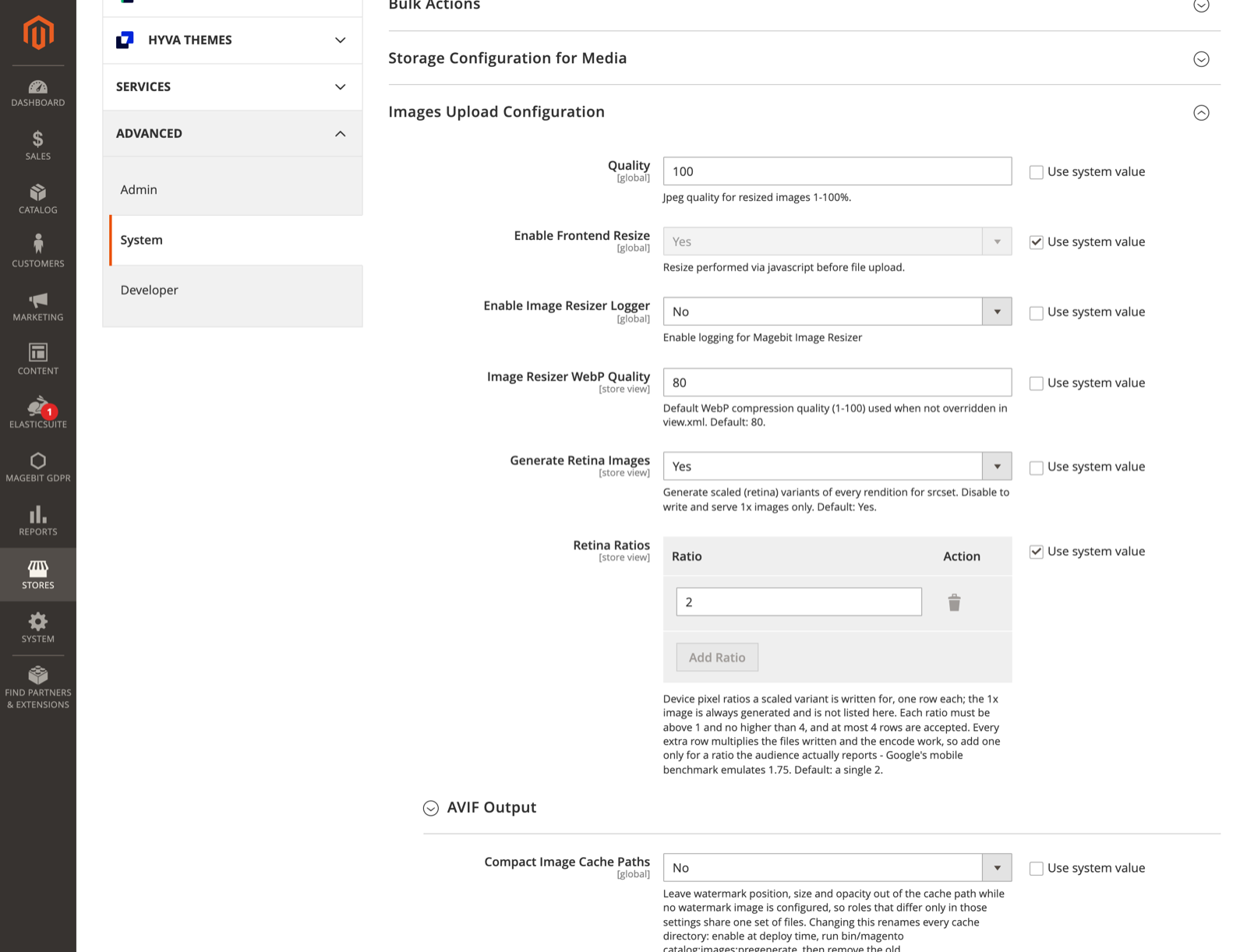
A ratio reaches the markup as a density descriptor without trailing zeros, so a row of 1.75 produces 1.75x. The 1x candidate is the standard rendition, which is why it is not listed in the table. One set of ratios covers the <picture> sources, the <img> fallback srcset, WebP and AVIF alike.
Every row multiplies the files written and the encode work for each source image and each format, so add one only for a ratio the audience reports. Google's mobile Lighthouse run emulates a device pixel ratio of 1.75, and a store tuned for that score wants 1.75 in the table rather than 2.
The save is rejected for anything the renderer could not act on: a value that is not a number, a value of 1 or lower, a value above 4, a ratio that repeats an earlier row, more than four rows, and an empty table while retina is on. Ratios are stored rounded to two decimals, and the two bounds read different values: 4.001 is refused rather than rounded back into range, and 1.004 is refused because it would be stored as 1.
Two ratios can still resolve to one file. Under cover or frame mode the scale is capped against the source, so a source between 1x and 2x of the slot makes 2 and 3 write the same rendition. The srcset lists that file once, under the lower density, instead of claiming pixels it does not hold.
Width descriptors instead of 1x/2x
Image Resizer 0.1.18
getResponsiveSourcesWithWidths() and the desktop key below ship in Image Resizer 0.1.18.
Image Resizer 0.2.0
On 0.1.18 and 0.1.19 only the scaled JPEG candidate was measured. Under keepFrame(true) the scaled WebP and AVIF candidates fell back to the requested width, so a capped rendition was advertised at a width it was not written at. Every format reports its produced width from 0.2.0.
getResponsivePicture() and getResponsiveSources() describe each candidate by pixel density: 1x for the standard rendition and one entry per configured retina ratio, 2x on a default install. A density descriptor is a claim about the file, and it can be false. When the role is wider than the uploaded image and no frame is kept, Magento's adapter clamps the output to the source size, so a scaled candidate can carry the same pixels as the 1x one while telling the browser it has more. The density form also assumes the image occupies the layout width its role was designed for, which stops being true as soon as the same role is reused in a narrower or wider slot.
getResponsiveSourcesWithWidths() returns the same tiers, renditions and array shape, with each candidate carrying a w descriptor that states the width the adapter actually wrote:
$sources = $imageResizerViewModel
    ->keepFrame(false)
    ->matchSourceAspectRatio(true)
    ->getResponsiveSourcesWithWidths(
        'catalog/product/t/p/track-pant.jpg', // image path
        'product_page_image_medium'           // imageId from view.xml, 626px wide
    );
// desktop srcset on a 1080x1340 upload: ".../626x777.avif 626w, .../1080x1340.avif 1080w"- Candidates that collapse to the same width are emitted once. In the example above the
2xcandidate is a 1252px request against a 1080px upload, so it is reported as1080winstead of a2xthat does not exist. - Under
keepFrame(true)the canvas keeps the target aspect ratio, and the scale is still capped, by the axis the content is fitted on. The reported widths follow that cap rather than the requested ones. - The
sizesattribute stays with the caller. Only the template knows the layout, and awsrcset withoutsizesmakes the browser assume the image is full-width.
The method takes the same signature as getResponsiveSources(), including the breakpoint parameters. getResponsiveSources() itself is unchanged, so existing callers keep their density descriptors.
The desktop key. Both methods also return desktop, the desktop tier's raw URLs keyed by rendition. standard, webp and avif hold the 1x files. scaled, added in 0.2.0, maps each configured ratio to an entry holding that ratio and the standard, webp and avif URLs written at it. retina, webp_retina and avif_retina remain and point at the largest ratio that produced a file for their format, which is what a caller looking for the biggest available variant wants. Every key is present only when that variant exists. Use it where there is no <picture> to pick a format, such as a CSS background-image. Re-requesting the same dimensions through init() is not equivalent: with matchSourceAspectRatio(true) the height is derived from the width by rounding, so a doubled height and a height derived from a doubled width can differ by a pixel, which writes a second rendition instead of reusing the one already generated.
AVIF output
Image Resizer 0.1.16
AVIF output ships in Image Resizer 0.1.16 (bundled with Venta 1.7.0).
The resizer can generate AVIF variants next to WebP and JPEG. AVIF files are typically 20 to 50 percent smaller than WebP at the same visual quality, so browsers that support the format download less. The feature is off by default and is enabled per store under Stores > Configuration > Advanced > System > Images Upload Configuration.
When enabled:
- Every breakpoint tier gets a
<source type="image/avif">row before the WebP one, with a standard candidate and one per configured retina ratio. Browsers pick the first format they support, so AVIF-capable browsers use AVIF and the rest fall through to WebP. getResponsiveSources()returns the AVIF rows in the same order, and the Venta theme preloads the first known format of each tier, so LCP preloads follow the AVIF/WebP choice automatically.- AVIF quality is configured independently of the JPEG and WebP quality settings (default 60), in admin or through the
avif_qualityview.xml var.
WARNING
AVIF encoding is far heavier than WebP on both CPU and memory. AVIF is built on the AV1 codec, so encoding one image can take roughly ten times longer than WebP (more at high quality or large dimensions) and its peak memory per image runs several times higher. Enabling it also adds an AVIF variant to every image tier, at 1x and at each configured retina ratio, so the total generation work grows. Before turning it on in production, make sure the server has the CPU and RAM headroom, enable it during a low-traffic window, and pre-generate the variants (bin/magento catalog:images:pregenerate) so the cost is paid up front instead of on the first live request for each image.
Encoding uses GD, which must be compiled with AVIF support. When GD cannot encode AVIF, the format is skipped without errors and the picture serves WebP and JPEG as before, so the toggle is safe to enable on any server. A status panel under the toggle reports whether the server can encode AVIF, so support is visible before enabling.
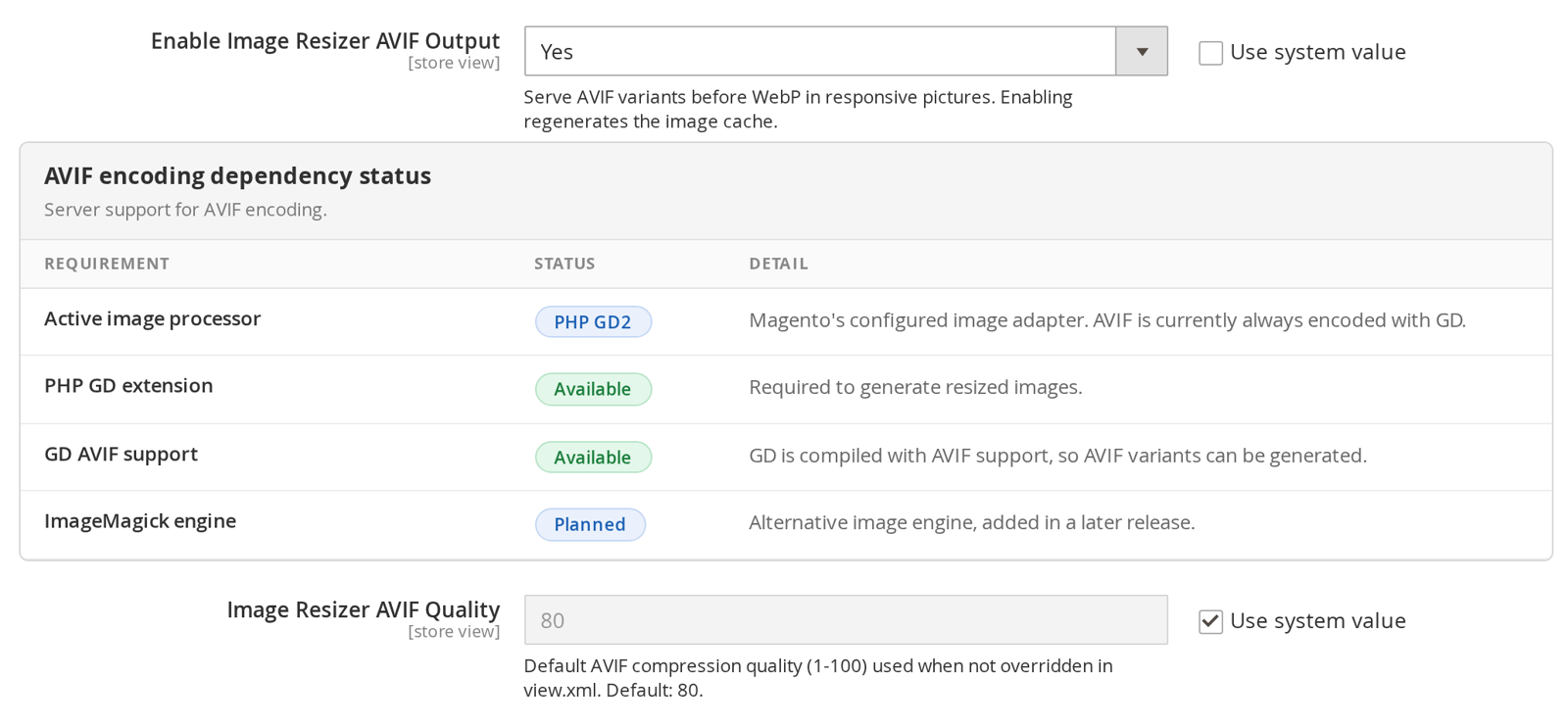
The panel lists the active image processor, the PHP GD extension, GD AVIF support, and the ImageMagick engine (a later addition). Check these rows first if AVIF images are not being generated.
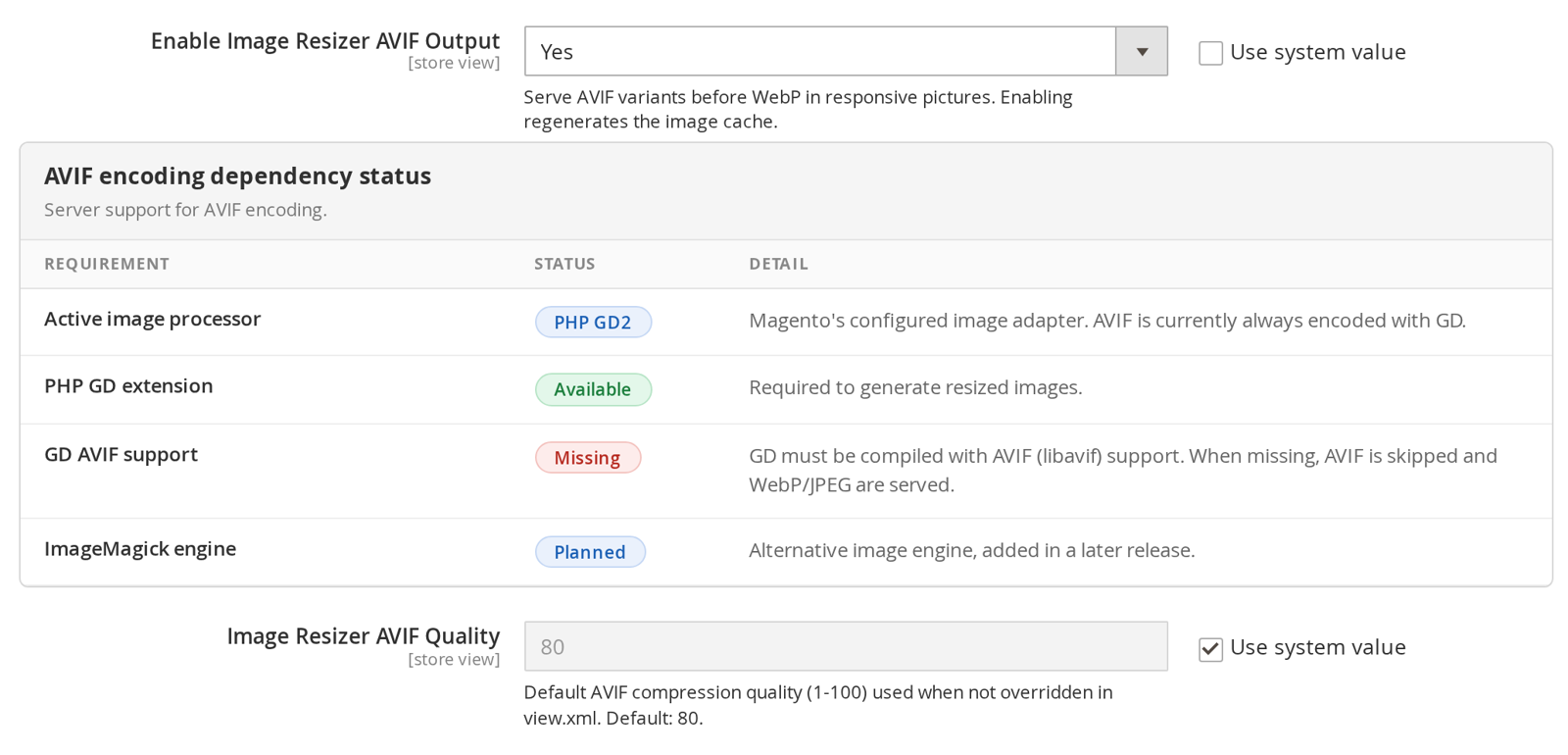
When the server's GD is not compiled with AVIF support, the GD AVIF support row shows Missing and the detail explains what to fix. AVIF is skipped and the pictures serve WebP and JPEG as before.
WARNING
Enabling AVIF (or changing its quality) becomes part of the image cache key, so the resized image cache regenerates. On large catalogs, warm it with catalog:images:pregenerate after enabling.
AVIF generation load
Image Resizer 0.1.19
The encoder speed, the separate retina AVIF switch and queue deferral ship in Image Resizer 0.1.19.
On a cold cache one image costs up to six encodes per responsive tier (JPEG, WebP and AVIF, at 1x and at each retina ratio), and the decoded bitmap of a large source runs to tens of megabytes. Three settings bound that work.
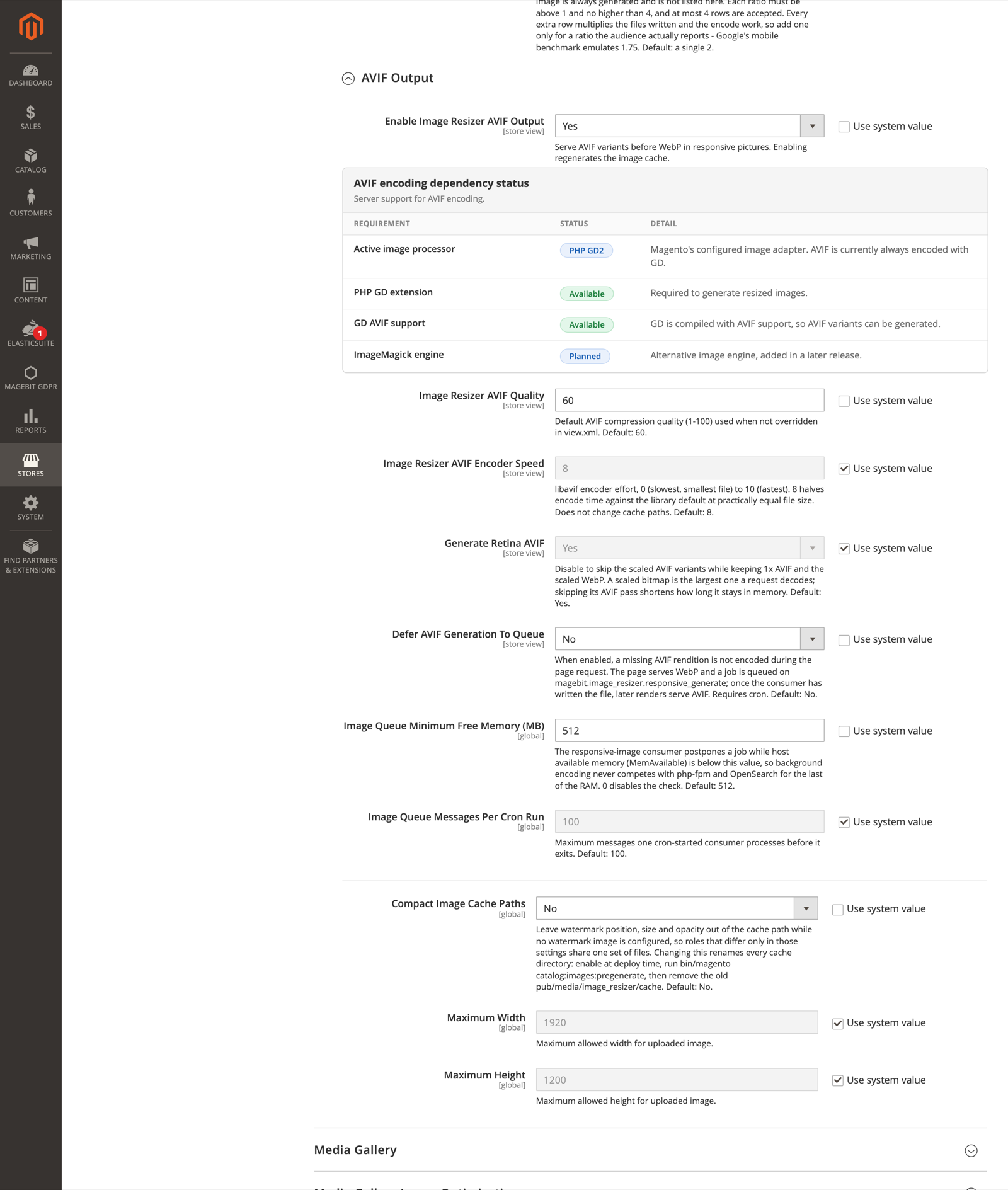
Image Resizer AVIF Encoder Speed is libavif's encoder effort, from 0 for the slowest and smallest file to 10 for the fastest. The default of 8 halves encode time against the library default at practically equal file size. It is not part of the cache path, so changing it regenerates nothing.
Generate Retina AVIF writes an AVIF variant at every configured ratio and is on by default. Turn it off to skip the scaled AVIF variants while keeping 1x AVIF and the scaled WebP. A scaled bitmap is the largest one a request decodes, so skipping its AVIF pass shortens how long it sits in memory.
Defer AVIF Generation To Queue moves the encode out of the page request. While the rendition is not on disk:
- No
<source type="image/avif">row is written for it and the browser falls through to WebP. A URL is never emitted for a file that does not exist, because a<picture>does not recover from a 404 on a<source>. - A job naming that rendition, with every resize parameter that shapes its cache path, is published to the
magebit.image_resizer.responsive_generatetopic. The same rendition is published once per request. - The
magebit_image_resizer_drain_responsive_queuecron job runs every minute and starts the consumer in the background while the queue holds messages, bounded by Image Queue Messages Per Cron Run. Once the file is written, later renders serve AVIF.
The consumer reads host memory before each job. While MemAvailable is under Image Queue Minimum Free Memory (MB) the job goes back on the queue instead of being encoded; after three postponements it is dropped and logged, so a starved host still drains its queue. A value of 0 skips the check.
Magento's own consumers_runner cron may start the same consumer. The consumer's lock keeps the two from running at once, so a deployment that already runs consumers through consumers_runner or supervisor needs no change.
catalog:images:pregenerate encodes AVIF during the run, with or without --async, so deferral never leaves a pre-generation pass without AVIF files.
Deferred or not, 0.1.19 frees each decoded bitmap as soon as the encodes for its rendition are done, deletes a failed or 0-byte AVIF write rather than leaving it cached as a valid file, and checks the AVIF cache without requiring the JPEG rendition to exist.
Advanced Usage Examples
Aspect Ratio Control
Maintain Original Aspect Ratio:
<?php
$imageResizerViewModel = $viewModels->require(ImageResizer::class);
?>
<!-- Aspect ratio = true (default) -->
<img src="<?= $escaper->escapeUrl($imageResizerViewModel
    ->init('Magebit_StyleGuide::images/test3.jpg')
    ->resize(100, 300)
    ->keepAspectRatio(true)
    ->getUrl()) ?>"/>

<!-- Aspect ratio = false (distorted) -->
<img src="<?= $escaper->escapeUrl($imageResizerViewModel
    ->init('Magebit_StyleGuide::images/test3.jpg')
    ->resize(100, 300)
    ->keepAspectRatio(false)
    ->getUrl()) ?>"/>
Match the Source Aspect Ratio:
Image Resizer 0.1.13
matchSourceAspectRatio() ships in Image Resizer 0.1.13.
matchSourceAspectRatio(true) recomputes the height from the uploaded file's own proportions at the width the role declares, so the declared height acts as a hint rather than a target. Use it for slots that accept uploads of mixed aspect ratios, such as banners and CMS images: the image keeps its appearance, and because the resizer still reports concrete dimensions the slot reserves the right box and does not shift the layout.
cms_image_hero is one of the four Venta CMS image roles, added in 1.7.1.
<?= $imageResizerViewModel
    ->keepFrame(false)
    ->matchSourceAspectRatio(true)
    ->getResponsivePicture(
        'wysiwyg/home/hero.jpg',
        null,
        ['alt' => $escaper->escapeHtmlAttr($title)],
        'cms_image_hero'
    ); ?>
Constrain and Frame Options
Constrain Only (Prevent Upscaling):
<?php
$imageResizerViewModel = $viewModels->require(ImageResizer::class);
?>
<!-- Constrain only = true (won't exceed original size) -->
<img src="<?= $escaper->escapeUrl($imageResizerViewModel
    ->init('Magebit_StyleGuide::images/test2.jpg')
    ->resize(800)
    ->constrainOnly(true)
    ->backgroundColor([0, 0, 0])
    ->getUrl()) ?>"/>

<!-- Constrain only = false (can exceed original size) -->
<img src="<?= $escaper->escapeUrl($imageResizerViewModel
    ->init('Magebit_StyleGuide::images/test2.jpg')
    ->resize(800)
    ->constrainOnly(false)
    ->backgroundColor([0, 0, 0])
    ->getUrl()) ?>"/>
Frame Control:
<?php
$imageResizerViewModel = $viewModels->require(ImageResizer::class);
?>
<!-- Frame = true (exact dimensions with background) -->
<img src="<?= $escaper->escapeUrl($imageResizerViewModel
    ->init('Magebit_StyleGuide::images/test2.jpg')
    ->resize(800)
    ->keepFrame(true)
    ->backgroundColor([0, 0, 0])
    ->getUrl()) ?>"/>

<!-- Frame = false (natural dimensions) -->
<img src="<?= $escaper->escapeUrl($imageResizerViewModel
    ->init('Magebit_StyleGuide::images/test2.jpg')
    ->resize(800)
    ->keepFrame(false)
    ->backgroundColor([0, 0, 0])
    ->getUrl()) ?>"/>
Object-Fit Cover
CSS Object-Fit Behavior:
<?php
$imageResizerViewModel = $viewModels->require(ImageResizer::class);
?>
<img src="<?= $escaper->escapeUrl($imageResizerViewModel
    ->init('Magebit_StyleGuide::images/test2.jpg')
    ->resize(800, 200)
    ->setObjectFit(true)
    ->getUrl()) ?>"/>
Quality Control
Custom Image Quality:
<?php
$imageResizerViewModel = $viewModels->require(ImageResizer::class);
?>
<img src="<?= $escaper->escapeUrl($imageResizerViewModel
    ->init('Magebit_StyleGuide::images/test2.jpg')
    ->quality(1) // Very low quality for demonstration
    ->getUrl()) ?>"/>
Image Rotation
Rotate Images:
<?php
$imageResizerViewModel = $viewModels->require(ImageResizer::class);
?>
<img src="<?= $escaper->escapeUrl($imageResizerViewModel
    ->init('Magebit_StyleGuide::images/test2.jpg')
    ->rotate(90) // Rotate 90 degrees
    ->getUrl()) ?>"/>
Background Colors
Custom Background Colors:
<?php
$imageResizerViewModel = $viewModels->require(ImageResizer::class);
?>
<img src="<?= $escaper->escapeUrl($imageResizerViewModel
    ->init('Magebit_StyleGuide::images/test1.jpg')
    ->resize(200, 200)
    ->backgroundColor([255, 0, 255]) // Magenta background
    ->keepFrame(true)
    ->getUrl()) ?>"/>
Placeholder Images
Custom Placeholders:
<?php
$imageResizerViewModel = $viewModels->require(ImageResizer::class);
?>
<!-- Default catalog placeholder -->
<img src="<?= $escaper->escapeUrl($imageResizerViewModel
    ->init('non_existing_image_path')
    ->getUrl()) ?>"/>

<!-- Custom placeholder -->
<img src="<?= $escaper->escapeUrl($imageResizerViewModel
    ->init('non_existing_image_path')
    ->placeholder('Magebit_StyleGuide::images/test4.png')
    ->getUrl()) ?>"/>
Watermark Application
Add Watermarks:
<?php
$imageResizerViewModel = $viewModels->require(ImageResizer::class);
?>
<img src="<?= $escaper->escapeUrl($imageResizerViewModel
    ->init('Magebit_StyleGuide::images/test2.jpg')
    ->watermark(
        'Magebit_StyleGuide::images/test4.png', // Watermark image
        'center', // Position: top-left, top-right, bottom-left, bottom-right, stretch, tile, center
        '100, 100', // Size: "width, height"
        20 // Opacity: 0-100
    )->getUrl()) ?>"/>
Configuration
Configuration Levels
The extension operates with multiple levels of configuration, where lower levels override higher ones:
1. Global Configurations
Set default values for all resized images (e.g., background color for all images).
File: app/design/frontend/Vendor/theme/etc/view.xml
<view xmlns:xsi="http://www.w3.org/2001/XMLSchema-instance" xsi:noNamespaceSchemaLocation="urn:magento:framework:Config/etc/view.xsd">
   <vars module="Magebit_ImageResizer">
      <!-- CONFIGURATIONS GOES THERE -->
      <var name="background">255,255,255</var>
   </vars>
</view>
2. Image Type Configuration
Set values for groups of images when same configs must be applied to multiple images.
- Allowed Configs -
width,height,constrain,frame,aspect_ratio,transparency,background
File: app/design/frontend/Vendor/theme/etc/view.xml
<media>
     <images module="Magebit_ImageResizer">
         <image id="custom_image_1" type="image">
             <width>30</width>
             <height>30</height>
             <constrain>true</constrain>
             <frame>false</frame>
             <aspect_ratio>true</aspect_ratio>
             <transparency>false</transparency>
             <background>0,0,0</background>
         </image>
     </images>
</media>
Usage with Image ID:
<img src="<?= $imageResizerViewModel
              ->init('Magebit_StyleGuide::images/test.jpg', 'custom_image_1')
              ->getUrl(); ?>"/>
3. Initialization Time Attributes
All configurations allowed at initialization time:
<img src="<?= $imageResizerViewModel
               ->init('Magebit_StyleGuide::images/test.jpg', 'custom_image_1', [
                  \Magebit\ImageResizer\Model\Config::VIEW_XML_ATTRIBUTE_WIDTH => 100,
                  \Magebit\ImageResizer\Model\Config::VIEW_XML_ATTRIBUTE_CONSTRAIN => false,
                  \Magebit\ImageResizer\Model\Config::VIEW_XML_VAR_ATTRIBUTE_ROTATE => 90
               ])
               ->getUrl(); ?>"/>
4. ViewModel Method Configuration
The most preferred way to set configurations via viewModel methods.
Configuration Options
| Code | Type | Default | Description |
|---|---|---|---|
| type | string | image | Used to specify image type (image, thumbnail). Can be any text. Right now used to only set watermarks from catalog setting. |
| width | int | null | Used to specify width. If null, takes value from height |
| height | int | null | Used to specify height. If null, takes value from width |
| aspect_ratio | bool | true | Guarantee, that image picture width/height will not be distorted. |
| constrain | bool | true | Guarantee, that image picture will not be bigger, than it was. |
| frame | bool | null | Guarantee, that image will have dimensions, set in $width/$height. Not applicable, if keepAspectRatio(false). |
| object_fit_cover | bool | false | Works same as CSS object-fit property. Fit the size and crop the image. This property ignores keepFrame and keepAspectRatio. |
| background | array | [255, 255, 255] | Set color to fill image frame with. The keepTransparency(true) overrides this (if image has transparent color). |
| transparency | bool | true | Keep transparency for image if any. |
| rotate | int | null | Rotate image into specified angle |
| watermark | string | null | Watermark image path |
| watermark_position | string | null | Watermark position on image. Available values: top-left, top-right, bottom-left, bottom-right, stretch, tile, center |
| watermark_size | string | null | Watermark size on image. Format is "INTxINT" (example: "20x20") |
| watermark_opacity | int | null | Watermark opacity on image. |
| placeholder | string | null | Placeholder image path. |
| quality | int | null | Quality of the image. |
| webp_quality | int | 80 | WebP compression quality, tuned independently of quality. Resolves view.xml var, then admin config, then 80. Since 0.1.14. |
| avif_quality | int | 60 | AVIF compression quality, tuned independently of quality and webp_quality. Resolves view.xml var, then admin config, then 60. Since 0.1.16. |
| catalog_quality | bool | true | Use catalog config quality. |
| is_catalog_watermark | bool | true | Use catalog config watermark. |
Admin Configuration
Image Resizer 0.1.14
These admin fields ship in Image Resizer 0.1.14 (bundled with Venta 1.6.4).
The extension adds its admin fields under Stores > Configuration > Advanced > System > Images Upload Configuration:
- Image Resizer WebP Quality (
system/upload_configuration/magebit_image_resizer_webp_quality) - WebP compression quality, 1 to 100, default 80. Store-scoped. Changing it regenerates cached WebP, since the value is part of the cache key. - Enable Image Resizer Logger - Turns on the extension's own logging.
- Enable Image Resizer Debug Logging - Depends on the logger. When off, resizer errors are condensed to a single-line summary; when on, full stack traces are logged.
Image Resizer 0.1.16
The AVIF fields ship in Image Resizer 0.1.16 (bundled with Venta 1.7.0).
- Enable Image Resizer AVIF Output (
system/upload_configuration/magebit_image_resizer_avif_enabled) - Generates AVIF variants alongside WebP and serves them first in responsive pictures. Requires GD compiled with AVIF support; skipped silently when unavailable. Off by default. Enabling changes image cache paths, so the image cache regenerates. - Image Resizer AVIF Quality (
system/upload_configuration/magebit_image_resizer_avif_quality) - AVIF compression quality, 1 to 100, default 60. Store-scoped and part of the cache key, like the WebP quality. Shown only while AVIF output is enabled.
Image Resizer 0.1.19
The fields below ship in Image Resizer 0.1.19. The AVIF fields moved into an AVIF Output group in the same section and kept their configuration paths, so values saved with an earlier version are still read.
- Generate Retina Images (
system/upload_configuration/magebit_image_resizer_retina_enabled) - Writes the scaled variants of every rendition for the srcset. On by default and store-scoped. Set to No to write and serve 1x images only, which also makes the gallery zoom fall back to the 1x file. - Image Resizer AVIF Encoder Speed (
system/upload_configuration/magebit_image_resizer_avif_speed) - libavif encoder effort, 0 to 10, default 8. Store-scoped. Not part of the cache path. - Generate Retina AVIF (
system/upload_configuration/magebit_image_resizer_avif_retina_enabled) - Writes an AVIF variant at every configured retina ratio. On by default and store-scoped. Set to No to skip the scaled AVIF variants while keeping 1x AVIF and the scaled WebP. Shown only while AVIF output and retina images are both enabled. - Defer AVIF Generation To Queue (
system/upload_configuration/magebit_image_resizer_avif_deferred) - Queues a missing AVIF rendition instead of encoding it during the page request. Off by default, store-scoped, and needs cron. See AVIF generation load. - Image Queue Minimum Free Memory (MB) (
system/upload_configuration/magebit_image_resizer_queue_min_free_memory) - The responsive-image consumer postpones a job while hostMemAvailableis below this value. Default 512, 0 disables the check. Global. - Image Queue Messages Per Cron Run (
system/upload_configuration/magebit_image_resizer_queue_batch_size) - Most messages one cron-started consumer handles before it exits. Default 100. Global. - Compact Image Cache Paths (
system/upload_configuration/magebit_image_resizer_compact_cache_paths) - Leaves settings out of the cache path that cannot change the output, so roles that differ only in those settings share one set of files. Off by default and global. See Compact cache paths before enabling: every cache directory is renamed.
Image Resizer 0.2.0
The ratio table ships in Image Resizer 0.2.0.
- Retina Ratios (
system/upload_configuration/magebit_image_resizer_retina_ratios) - The device pixel ratios a scaled variant is written for, one row each. Defaults to a single2, is store-scoped, and is shown only while Generate Retina Images is enabled. The bounds and what the save refuses are described under retina ratios.
Pre-generating responsive images (CLI)
Image Resizer 0.1.14
The pre-generation command ships in Image Resizer 0.1.14 (bundled with Venta 1.6.4).
Responsive WebP, AVIF (when enabled) and retina variants are generated on demand the first time an image is requested. To warm them ahead of time, for example after a deployment or after enabling AVIF, run:
bin/magento catalog:images:pregenerateThe command walks every registered image source and generates its variants, showing a progress bar per source. In a Venta install the theme registers six: product cards, lifestyle images, widget images, category images, CMS responsive images and PDP gallery images. The last two ship with Venta 1.7.1.
Add --async to publish the work to the message queue instead of processing inline, then run the consumer:
bin/magento catalog:images:pregenerate --async
bin/magento queue:consumers:start magebit.image_resizer.responsive_generate --single-thread --max-messages=1000
From 0.1.19 the magebit_image_resizer_drain_responsive_queue cron job starts that consumer every minute while the queue holds messages, so the manual run is only needed where cron does not run.
This is separate from core catalog:images:resize. A module registers the images it wants pre-generated by implementing Magebit\ImageResizer\Api\ResponsiveImageSourceProviderInterface (getLabel() and getJobs()) and declaring it in di.xml.
WebP and AVIF are encoded in a single pass directly from the resized image, rather than re-encoding a JPEG, which avoids a second round of lossy compression.
Matching the storefront's cache keys
Image Resizer 0.1.18
The Job flags below ship in Image Resizer 0.1.18.
Pre-generation only pays off when it writes the same files the storefront asks for. Every resize option is part of the rendition path, so a provider whose job differs from its template in one flag warms a set of files nothing ever requests, and the first visitor still resizes on the fly.
Magebit\ImageResizer\Model\ResponsiveImage\Job takes two optional flags for the cases where the storefront call deviates from the role's view.xml defaults:
$objectFitCoverstates the object-fit setting the template actually reads, instead of inheriting the resizer's own configuration.$constrainOnlystates the constraint the template passes. It matters for a framed role whose canvas is larger than the upload: withconstrainleft at its default the adapter clamps the paste to the source size and centres it on the frame, so most of the requested pixels are background.
Both default to null, which keeps the role's own flags, so existing providers need no change. The async payload carries them as well, so --async and an inline run produce the same cache keys.
Caching
Cache Management
All resized images are located in pub/media/image_resizer/cache. Paths to resized images are stored in Magento cache.
Cache Behavior:
- If resized file doesn't exist or Magento cache is cleared, images will be resized again
- Cache can be cleared from Admin panel:
System > Cache Management > Pregenerated resized images files - Since 0.1.14 the clean action is gated by the module-owned ACL resource
Magebit_ImageResizer::clean_resized_images, so it can be granted to a dedicated admin role.
Cache Benefits:
- Improved performance through cached resized images
- Automatic regeneration when cache is cleared
- Centralized cache management through Magento admin
Compact cache paths
Image Resizer 0.1.19
Compact Image Cache Paths ships in Image Resizer 0.1.19.
The cache directory name is a hash of the resize parameters. Hashing what was requested means two requests the adapter collapses to identical pixels are written into separate directories. On one live cache, 36 of the 77 directories holding a single product image were byte-identical copies.
With the setting on, the hash covers what is produced instead. It drops the watermark position, size and opacity while no watermark image is configured, the background when no frame is painted and no transparency is flattened, the transparency flag for sources with no alpha channel, and the cover flag when the target has the source's aspect ratio and fits inside it, so the crop does nothing. A box at least as large as the source that forbids upscaling is hashed as the source size, since it can only ever produce the source. Requests that crop or letterbox are left alone, because predicting their output would mean reproducing the adapter's rounding.
WARNING
Switching this on or off renames every cache directory. Do it at deploy time: enable the setting and flush the config cache, run bin/magento catalog:images:pregenerate so the new directories exist before traffic asks for them, remove the old contents of pub/media/image_resizer/cache, then purge the CDN. Cached HTML keeps pointing at the old paths until the pages are re-rendered.
Missing renditions
Image Resizer 0.1.19
The 404 response for missing renditions ships in Image Resizer 0.1.19.
A file under pub/media is served by the web server, so only a miss reaches PHP. Magento answers every miss with the product placeholder as an HTTP 200, which is wrong twice over for a rendition: a <picture> does not recover from a <source> that resolves to the wrong image, and a CDN caches the 200 for its whole TTL, so the placeholder outlives the file it stood in for and no Magento cache command clears it. Monitoring sees 200 throughout and reports nothing.
The module answers 404 for anything under pub/media/image_resizer/cache that is not on disk. The response carries Cache-Control: public, max-age=60 rather than no-store, because cached HTML pointing at renamed directories would otherwise send every request for every stale path through a full application bootstrap. Paths outside the module's own cache directory are untouched, so products without an image still get the placeholder Magento intends.