

How to set up shimmer for Express Checkout
Introduction
This guide outlines the implementation of shimmer loading effects for Express Checkout buttons, using the same approach as in the VentaPayPal feature module — a supporting module within our Venta Theme.
The primary goal of introducing shimmer effects is to maintain a clean and structured user interface during the asynchronous loading of the PayPal button. This ensures the page layout remains visually stable and polished, even while waiting for third-party scripts to load.
Important
This solution is built for PayPal Express Checkout and may not work as-is with other payment providers due to differences in how their buttons load or initialize. Still, the general approach — managing loading states, preserving clean layouts, and using shimmer placeholders — can guide similar experiences for other systems.
Preparation
1. Determine button rendering logic
First, determine how the rendering and initialization of Express Checkout buttons is handled in your project.
Since the number of buttons may vary depending on configuration, it is crucial to identify the exact number of buttons that will be requested and rendered.
In the case of PayPal, we make a request to their SDK via a URL that includes parameters defining how many buttons should be initialized.
Note on configuration
Ensure that your project configuration is valid. For example, PayPal's Venmo method will only appear if the conditions for it are met (such as operating in the US region). If your configuration is incorrect, you may request X buttons, but PayPal will return Y due to unmet requirements.
Accurate detection and alignment with SDK expectations is critical for correct shimmer behavior.
2. Inspect SDK request parameters
Using Chrome DevTools and the Network tab, you can locate the relevant SDK request. In the case of PayPal, the request payload reveals key integration data (see image below for reference):
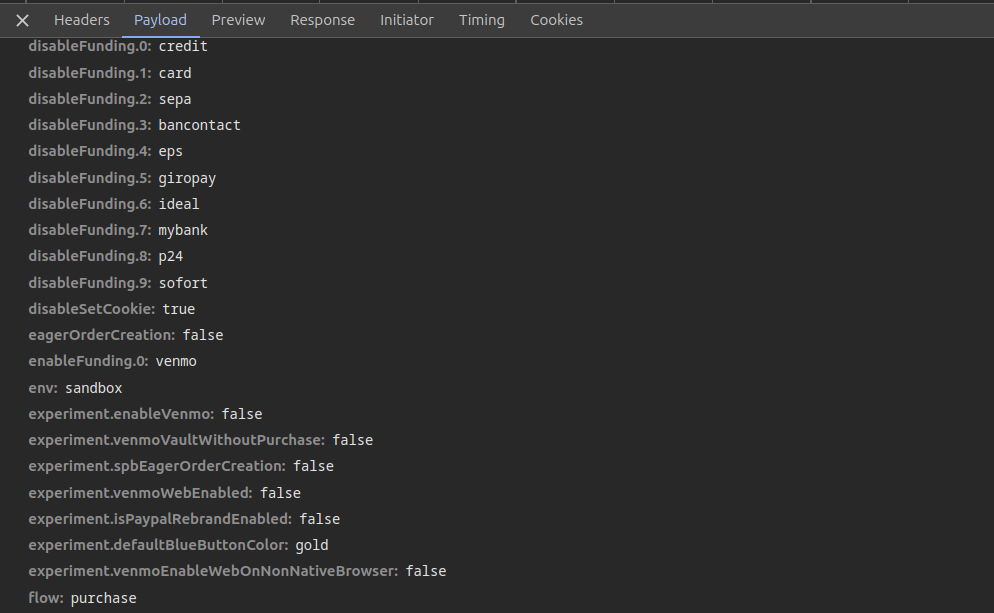
By inspecting the payload, we can identify the enabledFunding field, which lists all additional payment methods that are requested.
Implementation
To ensure a smooth page load without sudden layout shifts when the buttons arrive, the shimmer elements must already exist in the DOM before the buttons are rendered.
We achieve this by generating the required number of shimmer placeholders on the server side using PHP. These shimmer elements are initially visible and styled to match the expected size, margins, padding, and layout of the actual buttons.
Info
It's important that the shimmer placeholders precisely mirror the dimensions and spacing of the real buttons. Any mismatch can cause layout shifts, leading to poor visual experience and instability during load.
Then, using JavaScript, we hide the shimmer placeholders once the corresponding real buttons have finished rendering. This ensures immediate placeholder visibility and a smooth asynchronous transition as actual buttons become available.
Backend
PayPal is included in the default Magento 2.4 installation, and its SDK URL construction logic resides in:
vendor/magento/module-paypal/Model/SdkUrl.php
However, the method getAllowedFunding() used to retrieve funding options is declared as private, making it inaccessible from outside.
If you are using Hyvä Theme
The easiest and most flexible approach is to implement a ViewModel within your custom module to extract and expose the expected funding methods to the frontend.
Example: PayPalSdkFunding ViewModel
<?php
declare(strict_types=1);

namespace Magebit\VentaPayPal\ViewModel;

use Laminas\Uri\UriFactory;
use Magento\Framework\View\Element\Block\ArgumentInterface;
use Magento\Paypal\Model\Config;
use Magento\Paypal\Model\SdkUrl;

final class PayPalSdkFunding implements ArgumentInterface
{
    private SdkUrl $sdkUrl;
    private Config $config;

    public function __construct(
        Config $config,
        SdkUrl $sdkUrl
    ) {
        $this->config = $config;
        $this->config->setMethod(Config::METHOD_EXPRESS);
        $this->sdkUrl = $sdkUrl;
    }

    /**
     * Extract query parameters from the SDK URL
     *
     * @return array<string,string>
     */
    private function getUrlQueryParams(): array
    {
        $url = $this->sdkUrl->getUrl();
        $uri = UriFactory::factory($url);

        return $uri->getQueryAsArray();
    }

    /**
     * Get supported funding methods
     *
     * @return string[]
     */
    public function getSupportedFundingMethods(): array
    {
        $params = $this->getUrlQueryParams();
        $enabledFunding = isset($params['enable-funding']) ? (string) $params['enable-funding'] : '';

        if (empty($enabledFunding)) {
            return [];
        }

        return explode(',', $enabledFunding);
    }
}
Reminder
Don't forget to register this ViewModel in your module's
etc/di.xmlso it becomes available in your templates.
Frontend
Generating shimmers
Inside the template where you plan to render the Express Checkout buttons, access the ViewModel and compute the list of methods:
use <Vendor>\<Module>\ViewModel\PayPalSdkFunding;
use Hyva\Theme\Model\ViewModelRegistry;

/** @var ViewModelRegistry $viewModels */
$paypalSdkFunding = $viewModels->require(PayPalSdkFunding::class);
$allowedMethods = $paypalSdkFunding->getSupportedFundingMethods();

// Ensure PayPal Express is always included
$allowedMethods = array_unique(array_merge(['paypal'], $allowedMethods));

$isMinicart = $isMinicart ?? false;
Render shimmers matching the number of methods:
<div class="paypal-shimmer-container<?= $isMinicart ? '-mini-cart' : '' ?> flex flex-col pb-5px gap-4.5">
  <?php foreach ($allowedMethods as $method): ?>
    <div class="shimmer h-13 w-full"></div>
  <?php endforeach; ?>
</div>
Hiding shimmers after render
Within the asynchronous initializeButtons()/SDK flow, hide the shimmer container once the real buttons have successfully rendered:
function onRender() {
  const shimmerContainer = document.querySelector(
    ".paypal-shimmer-container<?= $isMinicart ? '-mini-cart' : '' ?>"
  );
  if (shimmerContainer) {
    shimmerContainer.classList.add("hidden");
  }
}
Caution
querySelectoronly returns the first matching element. If both Mini Cart and Cart sections are rendered on the same page with the same class, only the first shimmer container will be hidden. Use unique class names per context (as shown with the-mini-cartsuffix).
This technique ensures that shimmer placeholders disappear only when the corresponding real buttons are fully ready, preserving UX and avoiding layout flickering.
Conclusion
Implementing shimmer placeholders for Express Checkout buttons helps deliver a smooth and visually stable user experience, especially when working with asynchronous SDKs like PayPal. In this guide, we demonstrated how to detect available funding methods, render accurate placeholders using PHP and Tailwind CSS, and remove them with JavaScript once the buttons are ready.
While the example is based on PayPal and Magento (with Hyvä integration), a similar approach can be adapted to other payment providers and platforms with comparable requirements.