

Product Attribute Configuration
Customizing product attribute display in the Venta Theme. This configuration provides settings for tailoring attribute display and behavior, enhancing store product presentation and customer experience.
Overview
The Product Attribute Configuration describes available configuration settings for Product Attributes provided by the Venta Theme for Magento 2. These settings allow customization of attribute display and behavior, enhancing product presentation and customer experience. Configurations can be easily managed within the Magento admin panel.
Manage Labels
Configure custom labels for product attributes to improve clarity and user guidance.
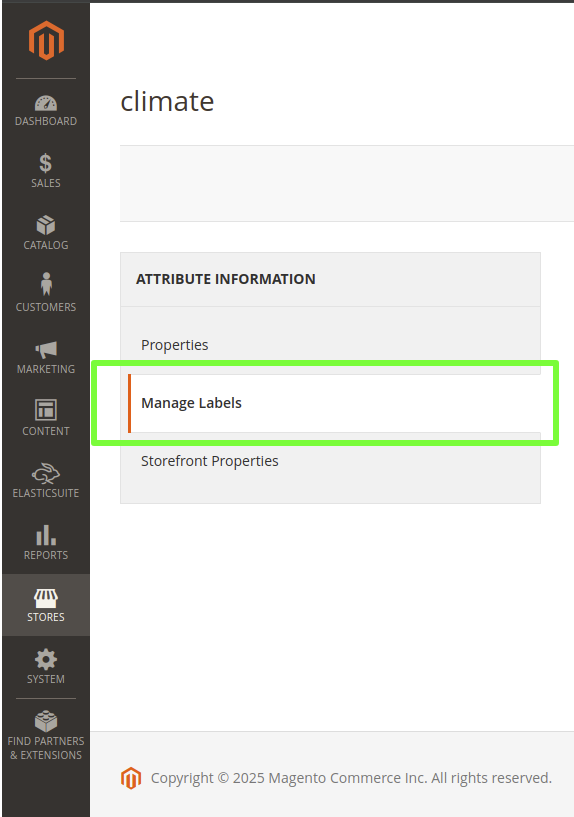
Manage Short Description
Configure custom descriptions for product attributes across different store views. Short descriptions are displayed as tooltips in multiple locations, improving user guidance and clarity regarding attribute meanings.

Storefront Properties
Configure how specific product attributes are displayed on the storefront within the Venta Theme.
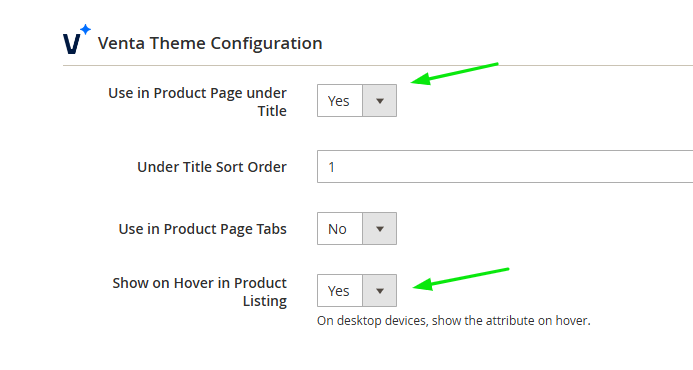
Use in Product Page Under Title
Control whether attributes appear directly below the product title on the product detail page.
Configuration Options:
- Yes - Displays the attribute below the product title on the product page
- No - The attribute is not shown in this location (default)
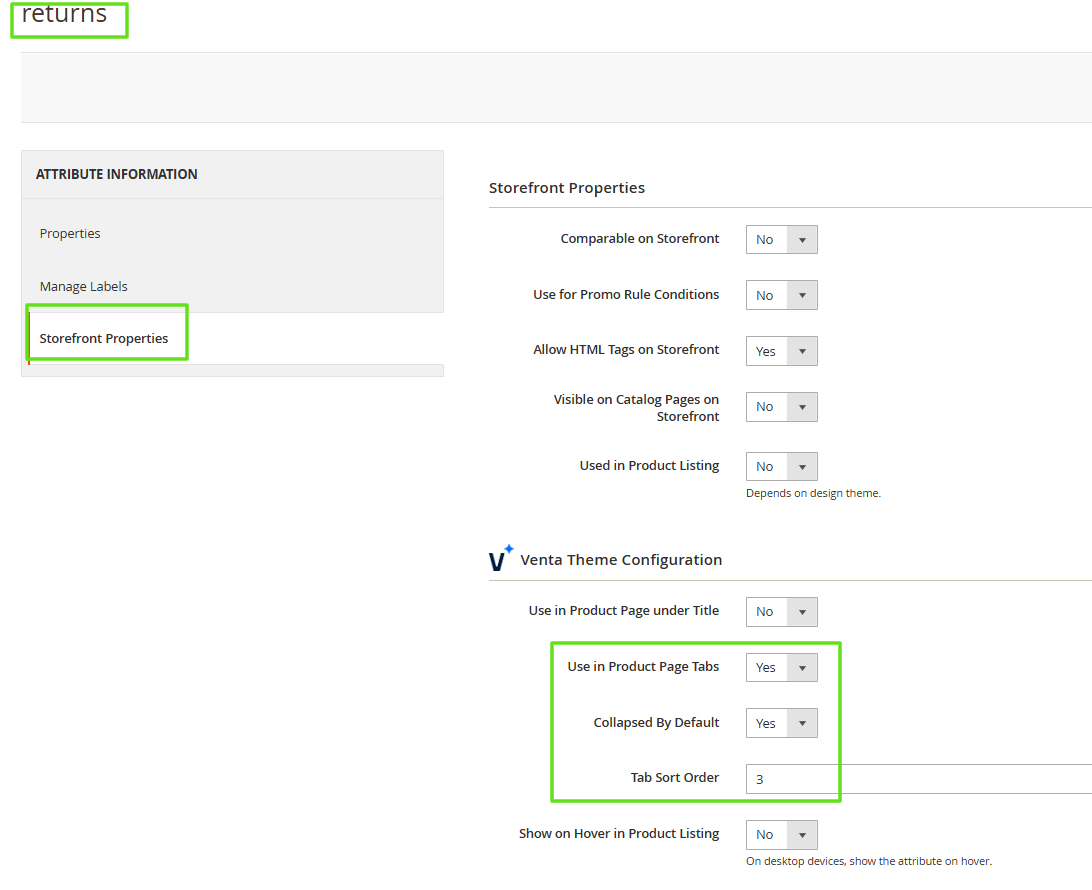
Use in Product Page Tabs
Control whether attributes appear as tabs on the product page alongside Description or Additional Info sections.
Configuration Options:
- Yes - Displays the attribute within the product page tab section
- No - The attribute is not shown in tabs (default)
INFO
Attribute tabs show a per-product value. Tabs with shared content for all products, such as delivery terms, are managed separately as global CMS block tabs. See Product Tabs.
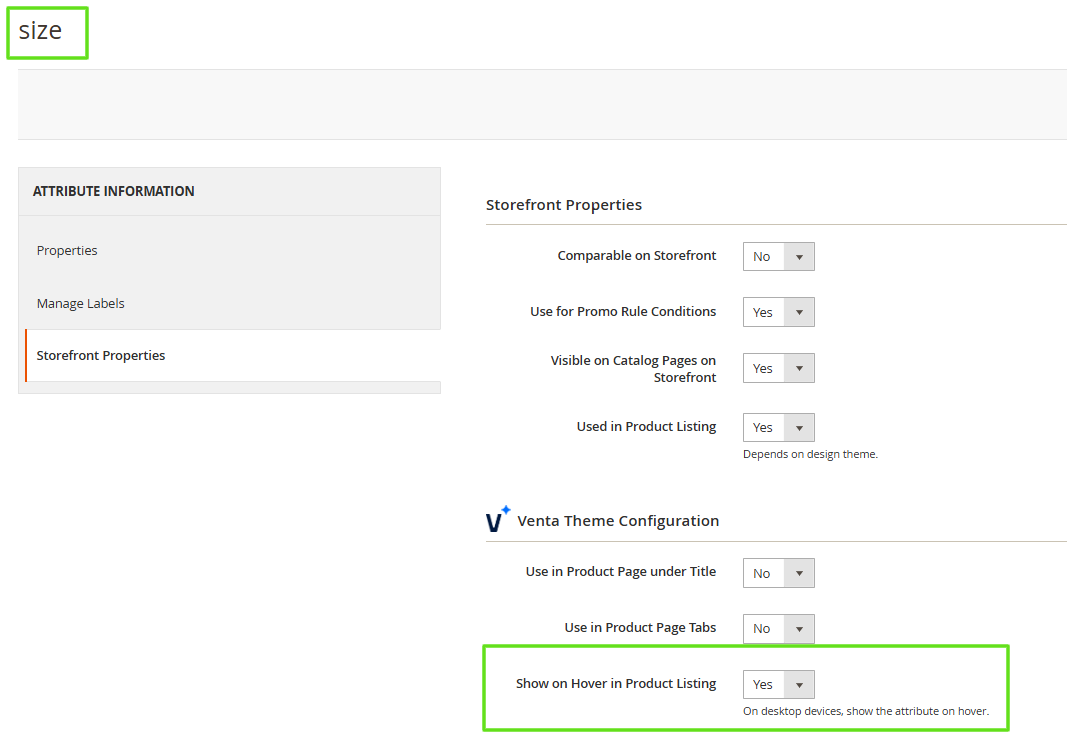
Show on Hover in Product Listing
Control attribute visibility on product and category pages when hovering over products.
Configuration Options:
- Yes - Displays the attribute when hovering over a product in category pages or search results (desktop only)
- No - The attribute is not shown on hover (default)
INFO
Swatch Requirement: This configuration is relevant only for attributes that have swatches (like size, color). If an attribute has no swatches, there will be no effect after enabling this configuration.
Enable Attribute Count Limit
INFO
Version Requirement: Available starting from Venta Theme 1.5.0
Control the number of visible swatch attribute options in the product card on both Product Listing Pages (PLP) and Product Detail Pages (PDP).
Configuration Options:
- Yes - Limits the number of visible swatch attributes in the product card before showing a "+X" indicator
- Separate limits can be configured for mobile and desktop
- No - Displays all swatch attributes by default, without any limit (default)
INFO
Attribute Type Requirement: This configuration is only available for attributes of the Swatch Text and Visual Swatch types.
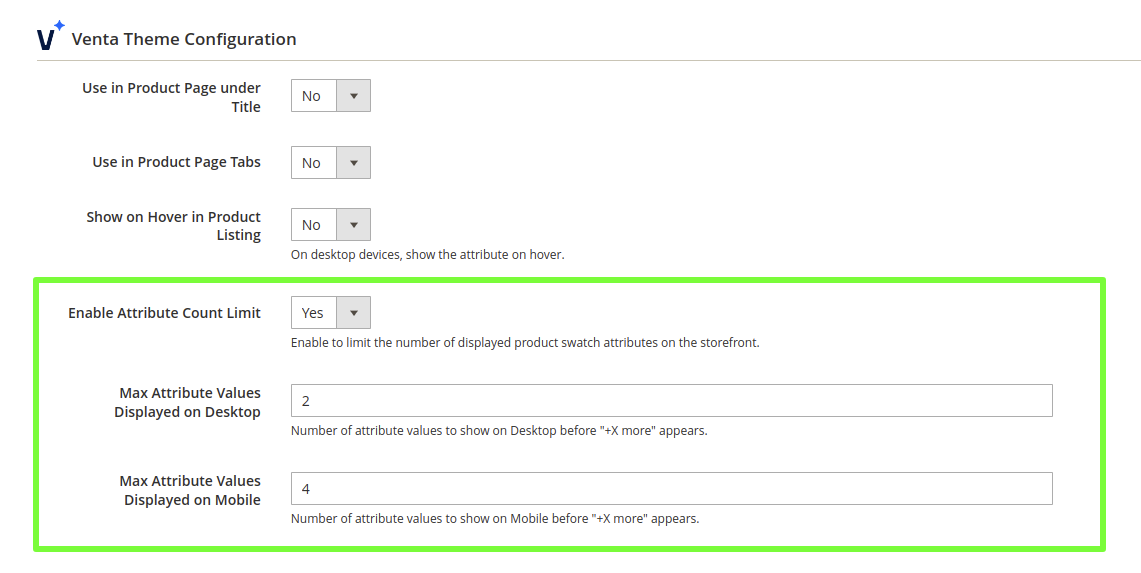
Configuration Behavior
Label Management
Custom labels allow administrators to define user-friendly names for product attributes, improving clarity and user experience across different store views.
Short Description Management
Short descriptions provide additional context for product attributes through tooltip functionality, enhancing user guidance and attribute understanding.
Storefront Display Control
Storefront properties provide granular control over attribute visibility and positioning, allowing customization of product presentation to match specific design requirements and user experience goals.
CMS Block Attribute Type
The Venta Theme extends Magento's attribute system with a custom Catalog Input Type for Store Owner called "CMS Block". This attribute type allows administrators to assign CMS blocks to products for consistent content management across multiple products.
Configuration
Attribute Type: CMS Block Target Users: Store Owner Purpose: Assign CMS blocks to products for consistent content display
Functionality
Attribute Creation:
- New Input Type - CMS Block is available as a Catalog Input Type when creating new attributes
- Store Owner Access - Specifically designed for store owner use in product management
- CMS Block Selection - Allows selection of existing CMS blocks during product editing
Product Assignment:
- Individual Assignment - CMS blocks can be assigned to individual products during product editing
- Mass Action Support - CMS blocks can be assigned to multiple products simultaneously via mass action
- Frontend Display - Assigned CMS blocks are displayed on the product frontend
Use Cases
Content Consistency:
- Shared Content - Use the same CMS block content across multiple products
- Centralized Management - Update content in one CMS block to affect all assigned products
- Efficient Content Management - Reduce duplicate content creation and maintenance
Practical Applications:
- Product Descriptions - Share detailed product information across similar products
- Usage Instructions - Provide consistent usage instructions for product categories
- Promotional Content - Display the same promotional content across multiple products
- Legal Information - Share warranty or legal information across product lines
Implementation Benefits
Content Management:
- Single Source of Truth - One CMS block serves multiple products
- Easy Updates - Modify content once to update all assigned products
- Consistent Messaging - Ensure consistent content across product catalogs
Administrative Efficiency:
- Reduced Duplication - Eliminate need to create identical content for multiple products
- Mass Assignment - Quickly assign content to multiple products via mass actions
- Flexible Management - Easy to reassign or remove CMS blocks from products