

Server-side Tailwind Compilation
Venta compiles Tailwind classes used in CMS content with the Hyva CMS Tailwind JIT module. By default the compilation runs in the admin browser against a bundled Tailwind version, which does not know the theme's own tokens and utilities. The server-side setup replaces that with a Node daemon that compiles CMS content against the theme's own web/tailwind/ toolchain and stores only the delta CSS - the classes that are not already part of the theme's styles.css.
What it covers
Server-side compilation applies to the four native CMS entity types: CMS pages, CMS blocks, product descriptions and category descriptions (PageBuilder and TinyMCE content). It does not touch .phtml templates or the static theme build - those are still compiled by your regular Tailwind build. Venta's packaged CMS content is styled by the static build alone and works without any JIT setup.
Requirements
Check these four points before starting. If any of them fails, stay on the in-browser compiler (see Fallback).
- Packages. Three Hyva packages come from your own Hyva Packagist tenant:
hyva-themes/magento2-cms-tailwind-jitat^2.0(a hard requirement of the theme itself - without it the theme update to 1.7.0.1 fails to resolve), plushyva-themes/magento2-cms-tailwind-jit-bridgeandhyva-themes/magento2-cms-tailwind-recompilefor the server-side setup. Verify withcomposer show hyva-themes/magento2-cms-tailwind-jit -a(must list 2.x) andcomposer show hyva-themes/magento2-cms-tailwind-jit-bridge -a; if a package is not listed, request access from Hyva. The in-browser v4 fallback needs only the jit package that the theme already requires. - Infrastructure. Node 20 or newer and a long-running daemon process on every environment where CMS content is edited. On Adobe Commerce Cloud and shared hosting this is usually not possible.
- Deployment. The theme's
web/tailwind/directory (includinggenerated/*andnode_modules/) must reach the runtime, and every theme the daemon compiles against needs its compiledweb/css/styles.csspresent. - Operations. You manage a bearer token per environment, an
env.phptransport block, and a one-time bulk recompile after switching.
Installation
Update magebitcom/magento2-venta-theme to 1.7.0.1 or newer first. Earlier releases do not require the JIT module at ^2.0 and still ship a stale in-browser compiler configuration, so this guide does not apply to them.
Then remove any root composer.json pin of the JIT module. A pin like this blocks the update, because the Venta theme package requires ^2.0:
"hyva-themes/magento2-cms-tailwind-jit": "^1.2"Delete the line - the theme's own requirement controls the version. Then require the server-side packages:
composer require hyva-themes/magento2-cms-tailwind-jit-bridge hyva-themes/magento2-cms-tailwind-recompile
composer show hyva-themes/magento2-cms-tailwind-jit   # must report 2.x
bin/magento setup:upgrade
This installs and enables Hyva_CmsTailwindCompiler, Hyva_CmsTailwindJitBridge, Hyva_CmsTailwindRecompile and Hyva_AdminDashboardApi. The bridge switches the compiler mode to the daemon by itself; on a fresh install no configuration change is needed. Verify in admin under Stores > Configuration > Hyva Themes > PageBuilder > CMS Tailwind Compilation - the PageBuilder Tailwind Compiler field should read "Node Tailwind (server-side)".
Only if the compiler had earlier been set to v4 for the in-browser fallback, switch the stored value to the daemon - a stored value always overrides the bridge default:
bin/magento config:set hyva_cms_tailwind_jit/general/compiler_version daemon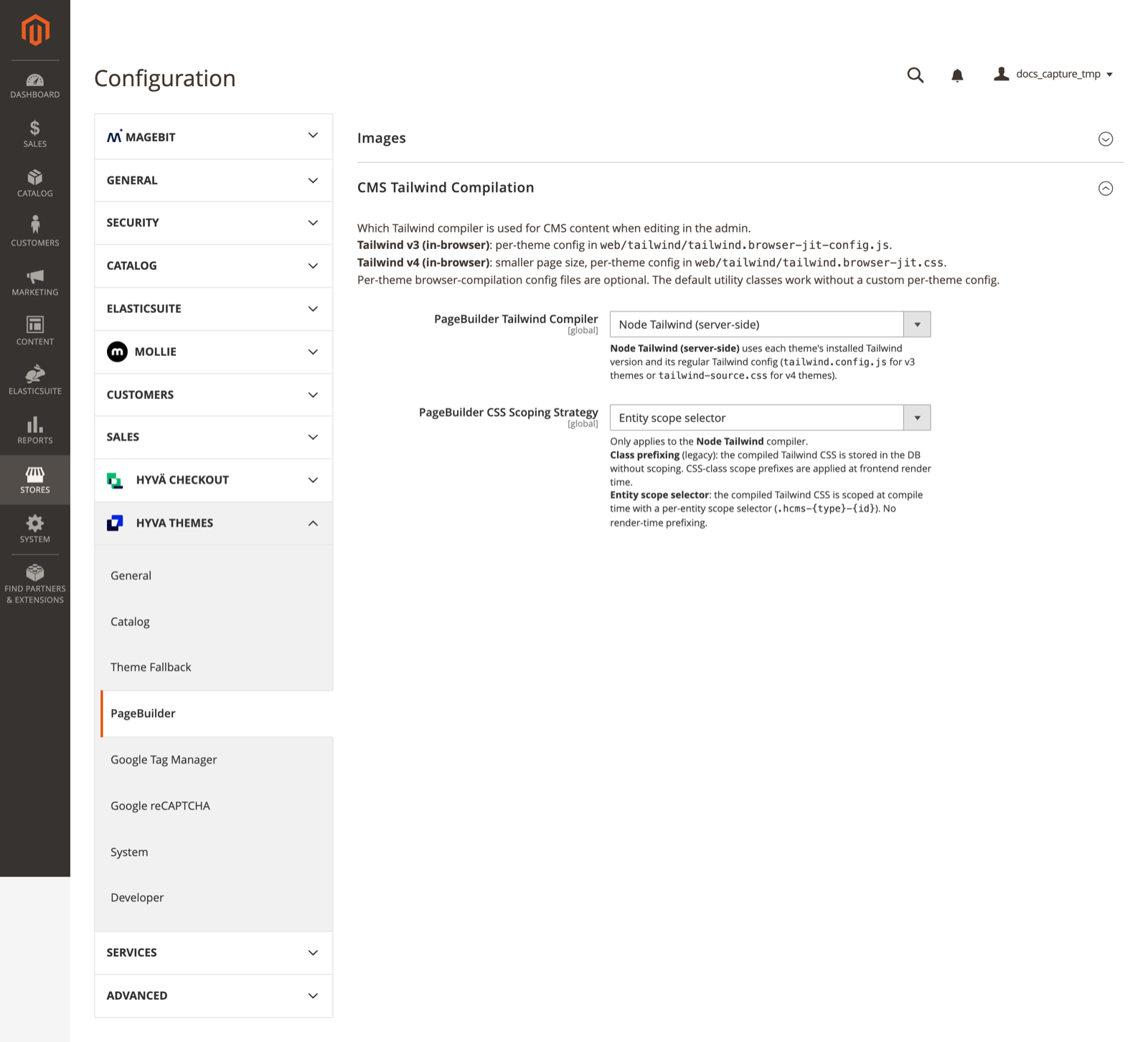
The shot also shows PageBuilder CSS Scoping Strategy on "Entity scope selector", the recommended value. A fresh install shows "Class prefixing (legacy)" here; CSS scoping strategy covers the switch.
CMS compilation is down until the daemon runs
From this point the compiler mode is daemon, but no daemon and no token exist yet. Saving CMS content in admin will show a compiler error and store no CSS until you complete Running the daemon. Do those steps immediately after the install.
Known package defects
Two upstream defects need patches through cweagans/composer-patches. Compiler 1.0.7 fixes the first one; the second still applies.
Compiler 1.0.6 rejects a healthy theme node_modules because it looks for esbuild platform binaries next to the package instead of under the @esbuild scope ("node_modules lack native binaries for this platform"). Compiler 1.0.7 ships the fix and the patch no longer applies to it, so use this patch only on 1.0.6 and remove it before updating. The patch:
--- a/node/lib/ensure-deps.mjs
+++ b/node/lib/ensure-deps.mjs
@@ -64,8 +64,9 @@
         const hasCurrentPlatform = siblings.some(name =>
             name.startsWith(pkg + '-') && name.includes(platform) && name.includes(arch)
         );
-        // Also check scoped packages (e.g. @esbuild/linux-arm64)
-        const scope = pkg.startsWith('@') ? pkg.split('/')[0] : null;
+        // Also check scoped packages (e.g. @esbuild/linux-arm64). Unscoped packages
+        // like esbuild ship their platform binaries under the @esbuild scope.
+        const scope = pkg.startsWith('@') ? pkg.split('/')[0] : '@' + pkg;
         const hasScopedPlatform = scope
             ? fs.existsSync(path.join(nodeModulesPath, scope))
               && fs.readdirSync(path.join(nodeModulesPath, scope)).some(name =>
With composer-exit-on-patch-failure enabled, a patch that fails to apply aborts composer install, so the 1.0.6 patch has to go before the compiler moves to 1.0.7.
JIT 2.0.2 treats a bare decimal inside a CSS value, such as oklch(90.3% .076 319.62), as a class selector while scoping stored CSS at render time and corrupts the value, so the affected utility silently stops applying:
--- a/src/Model/PrefixJitClasses.php
+++ b/src/Model/PrefixJitClasses.php
@@ -44,7 +44,10 @@
         // Match class selectors preceded by start-of-line, `}` (end of a previous rule),
         // whitespace, or `{` (the first rule inside an at-rule wrapper such as
         // `@layer utilities{` — the shape Tailwind v4's in-browser compiler emits).
-        $classes = preg_match_all('/(?:^|[{}]|\s)\.(?<classes>[^{]+)/m', $css, $matches)
+        // A dot followed by an unescaped digit is never a class selector (digits are
+        // escaped as e.g. `\32 xl` in compiled CSS) but a bare decimal inside a value
+        // such as `oklch(90.3% .076 319.62)` — skip those to keep values intact.
+        $classes = preg_match_all('/(?:^|[{}]|\s)\.(?<classes>(?![0-9])[^{]+)/m', $css, $matches)
             ? unique($matches['classes'])
             : [];
         $classes = reduce($classes, function (array $acc, string $class): array {
Running the daemon
The daemon is a single Node script shipped with the compiler package. It is self-contained; it does not need its own npm install.
Docker Compose
tailwind-daemon:
  container_name: <project>-tailwind-daemon
  image: node:20
  command: [ "bash", "./.docker/tailwind-daemon-startup.sh" ]
  working_dir: /var/www/html
  environment:
    - MALLOC_ARENA_MAX=2
    - TAILWIND_COMPILER_HOST=<project>-tailwind-daemon
  volumes:
    - ./.:/var/www/html
  user: 1000:1000
  restart: always
Two details matter here:
- Mount the project at the same absolute path as the PHP container. The PHP side sends absolute theme paths and the daemon resolves them on its own filesystem. If PHP sees the project at
/var/www/html, so must the daemon. - Use the unique container name as the bind host and later as
tcp_host. The daemon readsTAILWIND_COMPILER_HOSTfrom its environment and binds to that address. On a docker network shared by several projects, a generic service name resolves to every container that declares it and requests round-robin to the wrong daemon, which then rejects them with 401.
Create the startup script at .docker/tailwind-daemon-startup.sh, the path the Compose command runs. It waits for the token file and starts the daemon with the token in its environment:
#!/bin/bash
set -e
cd /var/www/html

STATE_FILE="var/hyva_cms_tailwind_daemon.json"
DAEMON="vendor/hyva-themes/magento2-cms-tailwind-compiler/node/daemon.mjs"

until [ -f "$STATE_FILE" ] && [ -f "$DAEMON" ]; do
    echo "Waiting for $STATE_FILE and $DAEMON (run: bin/magento hyva:cms-tailwind:token)"
    sleep 10
done

TAILWIND_COMPILER_AUTH_TOKEN="$(node -p 'JSON.parse(require("fs").readFileSync(process.argv[1], "utf8")).auth_token' "$STATE_FILE")"
export TAILWIND_COMPILER_AUTH_TOKEN

exec node "$DAEMON" --port 3200
On plain VMs without Docker, run the same command from a systemd unit and put the token in an EnvironmentFile readable only by the service user.
Token and env.php
Generate the bearer token once per environment:
bin/magento hyva:cms-tailwind:tokenThe command writes var/hyva_cms_tailwind_daemon.json, which is the single source for both sides: PHP reads it per request, the daemon receives the same value through the startup script. Rotation is hyva:cms-tailwind:token -f plus a daemon restart.
Add the transport block to app/etc/env.php (per environment, not committed). Note the two similar config namespaces: hyva_cms_tailwind below configures the daemon transport, while hyva_cms_tailwind_jit/general/compiler_version selects the compiler:
'hyva' => [
    'node_binary' => 'node'
],
'hyva_cms_tailwind' => [
    'transport' => 'tcp',
    'tcp_host' => '<project>-tailwind-daemon',
    'tcp_port' => 3200,
    'connect_timeout_ms' => 100,
    'read_timeout_ms' => 2500
],
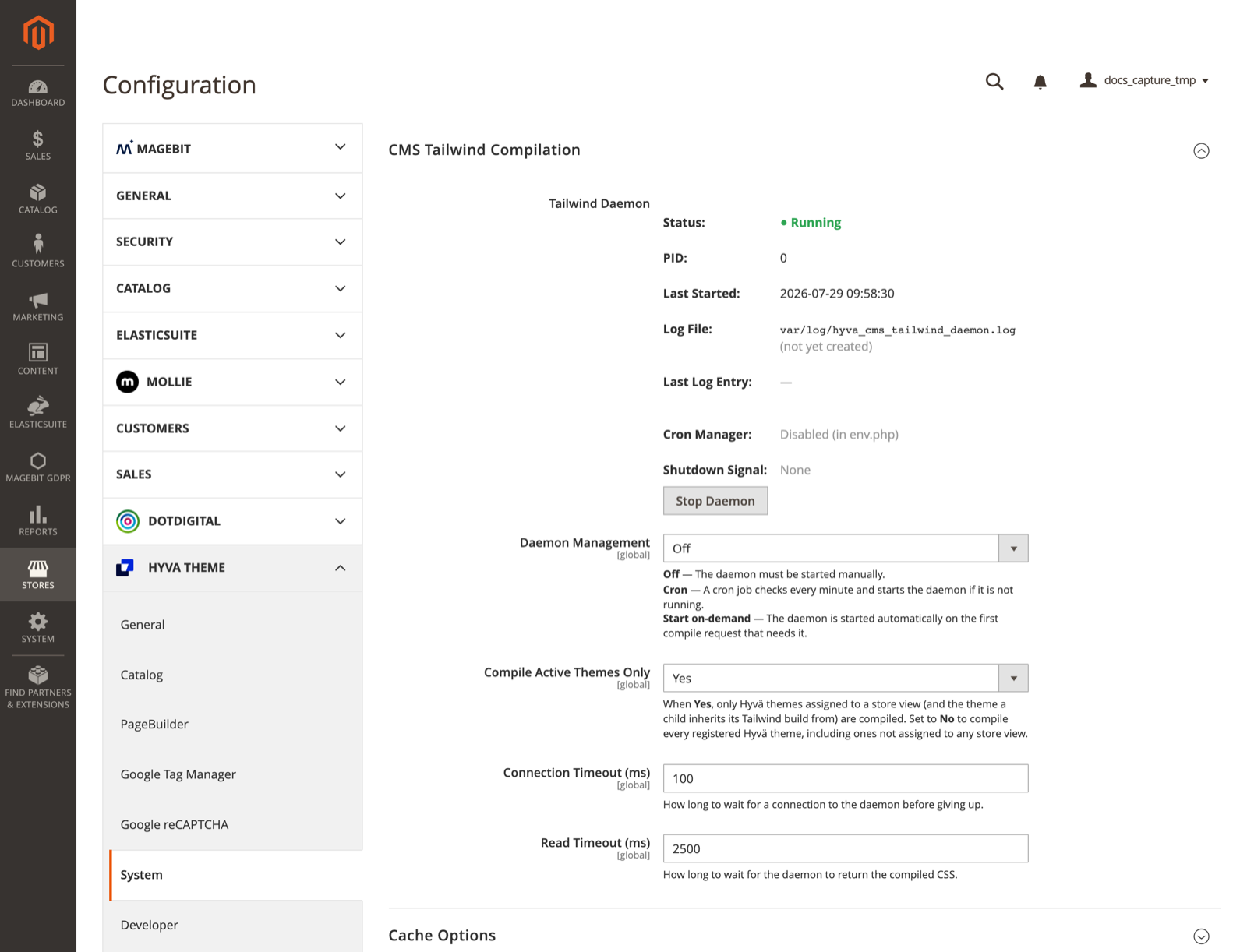
Leave Daemon Management at Off - the daemon lifecycle belongs to Compose or systemd, not to Magento. This field lives on a different screen than the compiler selector: Stores > Configuration > Hyva Themes > System > CMS Tailwind Compilation. The same screen shows the live daemon status and the connection timeouts configured in env.php.
CSS scoping strategy
Stores > Configuration > Hyva Themes > PageBuilder > CMS Tailwind Compilation > PageBuilder CSS Scoping Strategy (config path hyva_cms_tailwind/bridge/scoping_strategy) controls how the compiled CSS is isolated per entity. It applies to the Node Tailwind compiler only.
- Class prefixing (legacy), the shipped default: stored CSS is unscoped and class names in both the CSS and the entity HTML are rewritten with an entity prefix at frontend render time.
- Entity scope selector (
compiler): the CSS is scoped at compile time under a per-entity selector (.hcms-{type}-{id}), with no render-time rewriting. This matches the format the bulk recompile and the in-browser v4 compiler already produce.
Rows stored in either format keep rendering after a switch; the setting affects new compilations only. See the Hyva CMS Tailwind JIT documentation for the module's own reference.
We recommend the entity scope selector: it skips the render-time class rewriting (where the decimal-corruption defect patched above lives), produces one consistent stored format across admin saves, bulk recompiles and the v4 fallback, and does no per-request HTML work. Switch with:
bin/magento config:set hyva_cms_tailwind/bridge/scoping_strategy compilerDeployment
Build every theme tree the daemon compiles against. The daemon computes the delta against the theme's compiled
web/css/styles.cssand answers HTTP 422 ("Theme X has no web/css/styles.css") when it is missing. On the Venta reference installation the pipeline builds the vendor theme and both child themes on each deploy.Regenerate the token when the pipeline wipes
var/. A workspace cleanup deletes the token file and the daemon waits forever. Add the token command to the pipeline aftersetup:upgrade; the-qflag keeps the token out of the build log:groovydockerComposeExec(composeSpec, "php", "bin/magento hyva:cms-tailwind:token -q", "app")The startup script picks the fresh file up on its own - no restart step is needed.
Restart the daemon after Tailwind config changes, branch switches and
npm installin a theme. Changes tostyles.cssare watched and do not need a restart.
Child themes
The daemon compiles against the theme that is active on the storefront. On an installation with child themes it uses the child theme's own web/tailwind/ toolchain, which imports the Venta parent, and the stored CSS rows are keyed by the child theme code (for example frontend/Magebit/BaseTheme). Nothing needs to be configured for this; it follows from the theme assignment in Stores > Design > Configuration.
Databases imported from another installation
Stored rows in the hyva_*_tailwindcss tables are keyed by theme. If the database was imported from an installation with different theme codes, those rows never match and the recompile skips them, because it only refreshes rows of themes that exist locally. Content whose styling depends on delta CSS (for example arbitrary values like gap-[4vw]) then renders unstyled. Seed a placeholder row per entity for the installed theme and recompile:
INSERT INTO hyva_cms_block_tailwindcss (entity_id, theme, css)
SELECT DISTINCT t.entity_id, '<installed theme code>', '.pending-recompile{display:block}'
FROM hyva_cms_block_tailwindcss t
WHERE NOT EXISTS (
    SELECT 1 FROM hyva_cms_block_tailwindcss x
    WHERE x.entity_id = t.entity_id AND x.theme = '<installed theme code>'
);
Repeat for hyva_cms_page_tailwindcss, hyva_catalog_product_tailwindcss and hyva_catalog_category_tailwindcss.
Cutover recompile
This step only matters when switching an existing installation: CSS stored by the previous in-browser compiler was compiled against the wrong Tailwind and must be rebuilt once. A fresh installation with no previously saved CMS content has nothing to recompile and can skip it.
bin/magento hyva:cms-tailwind:recompileUseful flags: --background queues the work for cron (250 entities per minute), --theme=<code> limits to one theme, --status shows queue progress. The recompile only refreshes entities that already have stored rows; new content gets its row when it is saved in admin.
The synchronous mode stops on the first error and leaves its claimed queue rows in processing. The cron reclaims rows stuck longer than 10 minutes; on environments without a running cron, reset them by hand:
UPDATE hyva_cms_tailwind_recompile_queue SET status = 'pending' WHERE status = 'processing';Verify the setup
Three checks confirm the pipeline end to end:
Daemon health. From the PHP container:
bashcurl http://<project>-tailwind-daemon:3200/healthThe answer is
{"status":"ok"}. The endpoint is unauthenticated - never expose the daemon port publicly.Compile path. Edit a CMS block in admin, add a class that is not part of the static build (an arbitrary value such as
gap-[4vw]works well), and save. The save must complete without a compiler error toast, and the block's row inhyva_cms_block_tailwindcssfor the active theme now contains the compiled rule.Frontend. Open a page that renders the block. The page source contains a scoped style tag for the block (
.hcms-block-<id> ...) and the class visibly applies.
Fallback: in-browser Tailwind v4
If the daemon cannot run on an environment, use the in-browser Tailwind v4 compiler instead. Two steps: generate the theme configuration file and switch the compiler.
The in-browser compiler reads the theme's configuration from web/tailwind/tailwind.browser-jit.css in the active theme directory. Venta ships a generator for it. In a child theme (the usual case), add the script once to the theme's web/tailwind/package.json:
"generate-browser-jit": "node ../../../../../../../vendor/magebitcom/magento2-venta-theme/web/tailwind/generate-browser-jit.mjs"Then run it in the active theme's web/tailwind as part of your build:
npm run generate-browser-jitThe generator walks the theme's own tailwind-source.css import graph, so child-theme tokens and utilities are included. The file is read directly from the theme directory on each admin page load - no static content deploy or cache flush is needed; reload the edit page after regenerating. Without the file the compiler falls back to stock Tailwind defaults silently.
tailwind.browser-jit.css is a build artifact and is not committed to version control. A deployment that checks out a fresh workspace removes it, so on a fallback installation the generation step belongs in every deploy, right after the theme's Tailwind build.
Switch the compiler:
bin/magento config:set hyva_cms_tailwind_jit/general/compiler_version v4The same setting is available in admin: Stores > Configuration > Hyva Themes > PageBuilder > CMS Tailwind Compilation > PageBuilder Tailwind Compiler, option "Tailwind v4 (in-browser)".
Two follow-up notes:
- CMS content compiled before the switch keeps its old stored CSS. The bulk
hyva:cms-tailwind:recompilecommand ships with the server-side packages and is not available on a fallback-only installation; re-saving an entity in admin is the refresh path here. - Verify the same way as the daemon setup: save a CMS block using
containerand check the computedmax-widthis 1600px on the storefront. Stock Tailwind capscontainerat 1536px (the 2xl breakpoint) and adds no padding or centering.
Troubleshooting
| Symptom | Cause and fix |
|---|---|
| HTTP 401 from the daemon | Token desync. Both sides must use the value in var/hyva_cms_tailwind_daemon.json: rerun hyva:cms-tailwind:token -f and restart the daemon. On shared docker networks also check that tcp_host points to the unique container name, not a service name that several projects declare. |
| Intermittent 401, some requests fine | Two stacks on one docker network answer the same hostname. Use unique container names for the bind host and tcp_host. |
| HTTP 422 "Theme X has no web/css/styles.css" | The theme the daemon compiles against has no compiled CSS. Run the Tailwind build for that theme tree. |
| "node_modules lack native binaries for this platform" | Compiler 1.0.6 defect (esbuild scope detection) - apply the composer patch, or run npm install in the theme, or configure hyva_cms_tailwind/deps_dir in env.php. |
| A delta utility computes to an invalid value on the frontend | JIT 2.0.2 defect: bare decimals in oklch color values are mangled during render-time scoping. Apply the composer patch. |
| Admin daemon panel shows Log File "(not yet created)", Last Log Entry "-", PID 0 | Expected with Daemon Management set to Off: Magento writes var/log/hyva_cms_tailwind_daemon.log only when it spawns the daemon itself (cron / on-demand modes). With the compose-managed daemon the logs live in the container: docker logs <project>-tailwind-daemon. The Status field is a live probe and stays accurate. |
| Daemon container loops "Waiting for var/hyva_cms_tailwind_daemon.json" | The token was never generated on this environment, or the deploy wiped var/. Run bin/magento hyva:cms-tailwind:token. |
| CMS content compiles to stock Tailwind values (v4 fallback) | tailwind.browser-jit.css is missing or stale in the active theme directory - a fresh-workspace deploy removes it. Rerun npm run generate-browser-jit in the active theme and add it to the deploy pipeline. |
Queue rows stuck in processing | Synchronous recompile aborted earlier and no cron reclaims them. Reset the rows to pending (see Cutover recompile). |
| Quick health check | curl http://<project>-tailwind-daemon:3200/health from the PHP container returns {"status":"ok"} (see Verify the setup). |