

Company Lookup and EU VAT
The Company Lookup extension covers three related jobs for a store selling to businesses in the EU. It adds a company search to the Create Account page that fills in the address and registration fields from DatReal. It checks a customer's VAT number against the EU VIES service, moves them between two customer groups on the result, and replaces Magento's tax rate resolution with EU VAT rules for intra-EU B2B and cross-border B2C sales.
This module changes core tax configuration on install
setup:upgrade creates customer groups and tax classes, repoints the core General customer group at a new tax class, creates a Latvian tax rule, force-writes tax/calculation/based_on to shipping, and installs a nightly cron job that reassigns customer groups store-wide. The EU VAT rules are also on by default. Read What installation changes before installing on a store with existing tax rules or customer groups.
Documentation
- Benefits covers what the extension is worth to a B2B store.
Installation
Installation Command:
composer require magebitcom/magento2-venta-company-lookupPost-Installation Steps:
bin/magento module:enable Magebit_CompanyLookup
bin/magento setup:upgrade
bin/magento cache:flush
Configuration Access: Navigate to Stores > Configuration > Magebit > Company lookup & EU VAT to access the configuration options.
Requirements
| Requirement | Version |
|---|---|
| PHP | 8.3 or higher |
| PHP extension | soap, used for the VIES calls |
| Magento | 2.4.x |
| Hyvä theme module | any current release |
| Venta Theme | any current release |
composer.json declares only magento/framework, so Composer will not enforce any of the above. The module uses typed class constants, which are PHP 8.3 syntax, so an install on 8.1 or 8.2 fails at compile time rather than at install time. It also needs ext-soap and the Hyvä Modal and HyvaCsp view models.
The store makes outbound calls to two services, neither of which needs an account or an API key:
| Service | Used for |
|---|---|
datreal.com | Company lookup by registration number |
ec.europa.eu | VAT number validation through the EU VIES SOAP service |
No API keys
Both providers are keyless. DatReal is called as an unauthenticated request and VIES checkVat is a public EU Commission endpoint. There is no API key field in the configuration because there is nothing to enter.
What installation changes
Four data patches run on setup:upgrade. On a fresh Venta store they produce a working B2B tax setup. On a store with its own tax rules and customer groups they can change how existing orders are taxed, so review each one first.
| Change | Detail |
|---|---|
| Customer tax classes created | Tax Exempt and EU VAT Registered |
| Customer group created | Tax Exempt, and it is selected into the VIES configuration |
| Core General group modified | Its customer tax class is repointed to EU VAT Registered. Existing tax rules matched on General's previous class stop matching. |
Tax Exempt group tax class | The group is first created against the Tax Exempt tax class, then a later patch repoints it to Retail Customer, falling back to tax class ID 3 if no class of that name exists. The end state is Retail Customer. |
| Cron job installed | magebit_company_lookup_vies_tax_groups, 02:00 daily. On its first run it reassigns customer groups store-wide. See VIES VAT validation and customer groups. |
| Product tax class created | LV VAT Law Art. 143.1, and its ID is appended to the Art. 143.1 configuration field |
| Tax rule created | Magebit EU B2B LV Domestic Standard VAT, priority 0, covering all Latvian tax rates, with the product tax class hardcoded to ID 2. Skipped without a message if the store has no Latvian tax rate. |
| Core config written | tax/calculation/based_on is set to shipping |
| Legacy config migrated | Settings from the predecessor modules Magebit_DatReal, Magebit_EuVat, and the magebit_customer VIES cron are copied to the new paths, preserving scope and never overwriting a value already set |
The created tax rule targets fixed tax class IDs, so check it under Stores > Tax Rules after installing and confirm it matches the classes your store actually uses.
The module also forces the address fieldset onto the registration form by setting show_address_fields on customer_form_register. A store that deliberately kept address fields off signup gets them back.
Extension Configuration
Every field is available at default, website, and store view scope. The values below are the ones the installer writes.
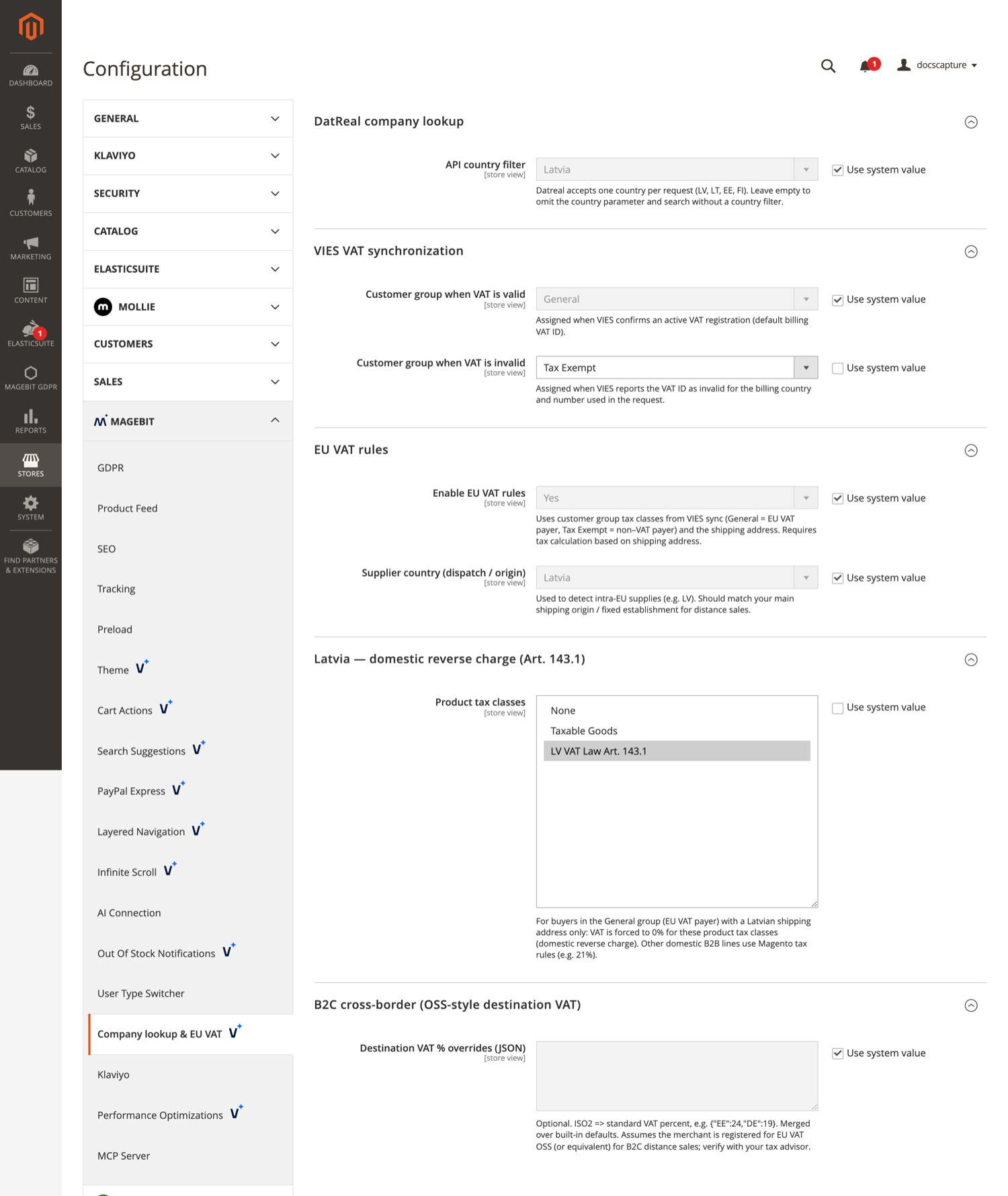
DatReal company lookup
| Field | Default | Description |
|---|---|---|
| API country filter | Latvia | The country sent with each lookup. DatReal accepts one country per request, from Latvia, Lithuania, Estonia, and Finland. Leave empty to omit the country parameter. |
This field applies only to requests that reach /companylookup/company/search without a country parameter of their own, which in practice means direct API calls rather than the registration form. The form refuses to search until the shopper has picked one of the four supported countries, and then sends that country, which takes precedence.
VIES VAT synchronization
| Field | Default | Description |
|---|---|---|
| Customer group when VAT is valid | General (group ID 1) | Assigned when VIES confirms an active VAT registration for the default billing address. The default is the literal ID 1, not a lookup by name, so on a store where group 1 is something else this points at the wrong group. |
| Customer group when VAT is invalid | set at install | Assigned when VIES reports the VAT ID as invalid for the billing country and number used. Set at install to the Tax Exempt group the module creates. |
WARNING
Customer group when VAT is invalid has no system default, only the value written at install. Clicking Use system value on it leaves the field empty, and the VIES sync then stops running for that scope with only a log entry to show for it.
EU VAT rules
| Field | Default | Description |
|---|---|---|
| Enable EU VAT rules | Yes | Applies the module's EU VAT resolution instead of Magento's tax rules for the participating tax classes. |
| Supplier country (dispatch / origin) | Latvia | The country supplies are dispatched from, used to detect intra-EU sales. |
Latvia, domestic reverse charge (Art. 143.1)
| Field | Default | Description |
|---|---|---|
| Product tax classes | set at install | For buyers in the valid-VAT group with a Latvian shipping address, VAT is forced to 0% for these product tax classes. Other domestic B2B lines fall back to Magento tax rules. Set at install to the LV VAT Law Art. 143.1 class. |
B2C cross-border (OSS-style destination VAT)
| Field | Default | Description |
|---|---|---|
| Destination VAT % overrides (JSON) | empty | ISO2 country code to standard VAT percent, for example {"EE":24,"DE":19}. Merged over the built-in table, with the overrides winning. |
Invalid JSON is discarded silently and treated as no overrides. There is no validation message and no log entry, so check the effect on a test order rather than trusting the save.
Company search on the registration page
A Find Company field appears above the address fields on Create Account. The shopper enters a company registration number and the module looks it up.
- The Search button stays disabled until the query is at least two characters and the form's country is Latvia, Lithuania, Estonia, or Finland.
- The lookup is an exact match on the registration number. There is no name search and no partial match, so a wrong digit returns nothing rather than a list to choose from.
- On a match, a modal shows the company name, address, registration number, and VAT number, with Confirm and Continue and Cancel.
- On confirm, the form is filled: street, city, postcode, country, region, and company, with the registration number written to
taxvatand the VAT number tovat_id. - The search field is then replaced by a summary card with a Change Company button, which clears the filled fields and leaves the country in place.
Region is matched against the region dropdown by name, with accents normalised and retries to survive the dropdown re-rendering after a country change. Latvia, Estonia, and Lithuania have region mappings. Finland has none, so a Finnish lookup fills the address but leaves the region empty.
Address parsing differs per country because DatReal formats them differently: for Finland the city field is authoritative and the address is street only, while for Latvia and Estonia the address is split on its first comma.
If DatReal is unavailable the shopper sees a message saying company lookup is temporarily unavailable and that registration can be completed without it. Any other failure shows "Could not find the company".
VIES VAT validation and customer groups
The module keeps customers in one of the two configured groups based on whether VIES says their default billing VAT ID is registered. Three triggers do this.
| Trigger | When it runs |
|---|---|
| Account creation | After the account is created, against the default billing address or the first address |
| Address save in My Account | On the address form post only, and it refreshes the session so the storefront sees the new group at once |
| Nightly cron | 02:00 every day, in the default cron group |
A VAT number that VIES reports as invalid moves the customer to the invalid group. A VIES outage, timeout, or SOAP fault leaves the group untouched, so a service failure never downgrades anyone.
The nightly job rewrites groups for every customer
The cron reads the whole customer_entity table on each run, with no incremental cursor, batching, or limit, and it moves any customer with no VAT ID on their default billing address into the invalid group. A customer manually placed in Wholesale, VIP, or any other B2B tier is moved out of it at 02:00. A customer with no default billing address counts as having no VAT ID and is moved too.
There is no admin setting for the schedule, the batch size, or the delay, and no CLI command to run or skip it. On a store where customer groups are managed by hand, disable this cron job before installing.
The job pauses 250 milliseconds after every customer it looks at, and calls VIES once per customer that has a VAT ID. On 10,000 customers that is over 40 minutes of waiting before any network time is counted.
EU VAT rate rules
With Enable EU VAT rules on, the module answers Magento's tax rate lookup itself for the customer tax classes carried by the valid-VAT group, the invalid-VAT group, and the not-logged-in group, and Magento's own tax rules are bypassed for those. Where two of those groups share a tax class, the same class serves both.
The rules apply only when all of these hold: the field is on, both the origin and the destination country are EU members, and the customer tax class is the one on the valid-VAT group, the one on the invalid-VAT group, or the one on the not-logged-in group. Any other group, including a custom Wholesale or Retailer group, falls through to plain Magento tax rules with no VAT logic applied.
Business buyers in the valid-VAT group:
| Situation | Rate |
|---|---|
| Destination differs from origin, buyer is not a Latvian VAT registrant | 0%, as an intra-EU reverse charge |
| Buyer is a Latvian VAT registrant, product is in an Art. 143.1 tax class | 0%, as a domestic reverse charge |
| Buyer is a Latvian VAT registrant, product is not in an Art. 143.1 tax class | The standard rate of the origin country |
| Destination is Latvia | The Latvian standard rate |
| Anything else | 0% |
Consumers, meaning the invalid-VAT group and guests: a Latvia to Latvia order on an Art. 143.1 product class gets the Latvian rate, and everything else gets the destination country's standard rate from the built-in table.
A buyer counts as a Latvian VAT registrant when they are logged in, their default billing country is LV, and their VAT ID starts with LV.
Limits to check before going live
The tax engine is built for a Latvian supplier selling into the EU. On any other origin country, the behaviours below change or break.
- Domestic B2B outside Latvia is charged 0% - With a non-Latvian origin, a business buyer in the origin country falls through to the final 0% case. A German store selling to a German business would charge no VAT.
- The Latvian registrant rate uses the origin country - A Latvian VAT registrant buying a product outside an Art. 143.1 class is charged the origin country's standard rate, not the destination country's.
- There is no distance selling threshold and no per-country opt-in - Every EU B2C order gets the destination country's rate as soon as the feature is on. A store below the €10,000 OSS threshold will charge the wrong VAT.
- One rate per country - The rate table and the override field both hold a single standard rate per country, so reduced rates for books, food, or medicine cannot be expressed. A catalog with mixed rates will mis-calculate cross-border B2C.
- The rate table is a fixed snapshot - It holds the 27 member states' standard rates, goes stale silently, and the JSON override field is the only way to correct it.
- The Art. 143.1 and Latvian registrant paths read the frontend customer session - They return false for guests, admin-created orders, REST orders, and cron. An admin placing an order for a Latvian B2B customer does not get the 0% treatment.
tax/calculation/based_onis only set once, at install - An admin who later switches it back to Billing Address gets wrong VAT with no warning.
With EU VAT rules on, the module flushes the tax rate cache before each collectTotals(). That keeps the rates correct and costs time on large carts.
Developer notes
Company search endpoint
| Item | Value |
|---|---|
| URL | GET /companylookup/company/search |
| Parameters | q, the registration number. country, checked against the four supported codes and falling back to the configured country. |
| Response | Always HTTP 200. {"results":[…]} with zero or one entry, or {"results":[],"error":…} on failure, with "code":"api_maintenance" when DatReal is down. |
The route takes no form key and needs no customer session, since it serves the Create Account page where the visitor is by definition not yet a customer.
Frontend integration points
The registration template is a CSP-safe Alpine component named initDatrealCompanySearch, registered through Alpine.data() on alpine:init with the inline script registered via HyvaCsp. Its modal is referenced as datreal-modal.
It dispatches four window events for other modules to listen on:
| Event | Payload |
|---|---|
datreal-company-confirmed | none |
datreal-address-resolution | {regionResolved, postcodeResolved} |
datreal-address-prefill-complete | none |
datreal-cancel-manual-fill | none |
It also listens for a datreal-country-changed event and looks for a #billing-datreal-hidden-fields element to switch into a second fill mode. Neither is provided by this module. The event has no dispatcher here and the element is never rendered here, so that second mode stays inactive unless another module or the theme supplies them.
Overlap with User Type Switcher
There is no code dependency between this module and User Type Switcher, but both write to the same company and vat_id address fields and both can change tax for business customers. Running the two together needs testing, since each is unaware of the other's tax decisions.
Troubleshooting
The company search box does not appear
The block is attached to customer_form_register as an unnamed child, so it renders only if the theme's register template outputs unnamed children. Confirm the active theme is Venta Theme or a child of it. If the address fields are missing as well, the layout override that forces them on is not being applied.
Search does nothing and the button stays greyed out
The button needs at least two characters and a supported country selected on the form. Latvia, Lithuania, Estonia, and Finland are the only countries DatReal is queried for.
A company that exists returns nothing
The lookup is an exact match on the registration number. Check the number digit by digit, and check that the country selected on the form is the company's country of registration.
Customer groups keep changing back overnight
That is the nightly VIES sync. Any customer whose default billing address has no VAT ID is moved to the invalid-VAT group on every run. Disable the magebit_company_lookup_vies_tax_groups cron job if groups are managed by hand.
VAT is wrong on an order
- Confirm which customer tax class the buyer's group carries. Only the classes on the valid-VAT, invalid-VAT and not-logged-in groups get the module's rules; everything else uses Magento tax rules.
- Confirm
tax/calculation/based_onis stillshipping. The module sets it at install and never rechecks it. - Check
Stores > Tax Rulesfor the rule the installer created, since it uses a hardcoded product tax class ID that may not match your store. - Review Limits to check before going live. A non-Latvian origin store hits several cases the engine does not handle.
The cross-border VAT rate is not the one I configured
- Invalid JSON in Destination VAT % overrides (JSON) is discarded silently, with no validation message and no log entry. Re-check the value parses, then confirm the effect on a test order rather than trusting the save.
- The overrides are merged over the built-in table, so a country absent from your JSON still gets the built-in rate.
- Only one standard rate per country can be expressed. A reduced-rate product will not get its reduced rate from this module.
Address fields reappeared on Create Account
The module forces show_address_fields on customer_form_register, because the company lookup has nothing to fill without them. A store that deliberately hid those fields gets them back on install. Removing the layout override also removes the lookup's ability to autofill.
The installer's tax rule is missing
Magebit EU B2B LV Domestic Standard VAT is only created when the store already has at least one Latvian tax rate. On a store with no LV rate the patch skips it without a message, and Stores > Tax Rules will show no such rule. Add the Latvian tax rates first, then re-run setup:upgrade, or create the rule by hand.
Region is empty after a lookup
Finland has no region mapping, so Finnish lookups leave the region blank. Latvia, Estonia, and Lithuania are mapped.