

Performance Optimizations
The Performance Optimizations extension raises full page cache hit rates on a Venta store by dropping customer group and login state from the X-Magento-Vary hash, so Varnish and the built-in cache keep one HTML variant per store view instead of one per customer group. Catalog prices are then fetched for the real group over AJAX once the page has loaded. A separate tool records every distinct vary hash together with the HTTP context that produced it, for diagnosing cache fragmentation.
Both features are off by default. Read Cache correctness limits before enabling unified vary on a live store.
Documentation
- Benefits covers what the extension changes for cache hit rates and hosting cost.
Installation
Installation Command:
composer require magebitcom/magento2-venta-performance-optimizationsPost-Installation Steps:
bin/magento module:enable Magebit_PerformanceOptimizations
bin/magento setup:upgrade
bin/magento cache:flush
Configuration Access: Navigate to Stores > Configuration > Magebit > Performance Optimizations to access the configuration options.
Requirements
| Requirement | Version |
|---|---|
| PHP | 8.1 or higher |
| Magento | 2.4.x |
| Hyvä theme module | any current release |
| Venta Theme | any current release, supplies the shimmer styling and the patched price slider template |
| Smile ElasticSuite | any current release, needed by the price slider endpoint |
What installation adds
- A cache type, Magebit AJAX Price Cache, in
System > Cache Management, holding the rendered AJAX price responses. - A grid at
System > Tools > X-Magento-Vary, backed by themagebit_performance_vary_recordtable. - Two ACL resources:
Magebit_PerformanceOptimizations::configfor the configuration section andMagebit_PerformanceOptimizations::varyfor the grid. An admin role without the second one does not see the menu item.
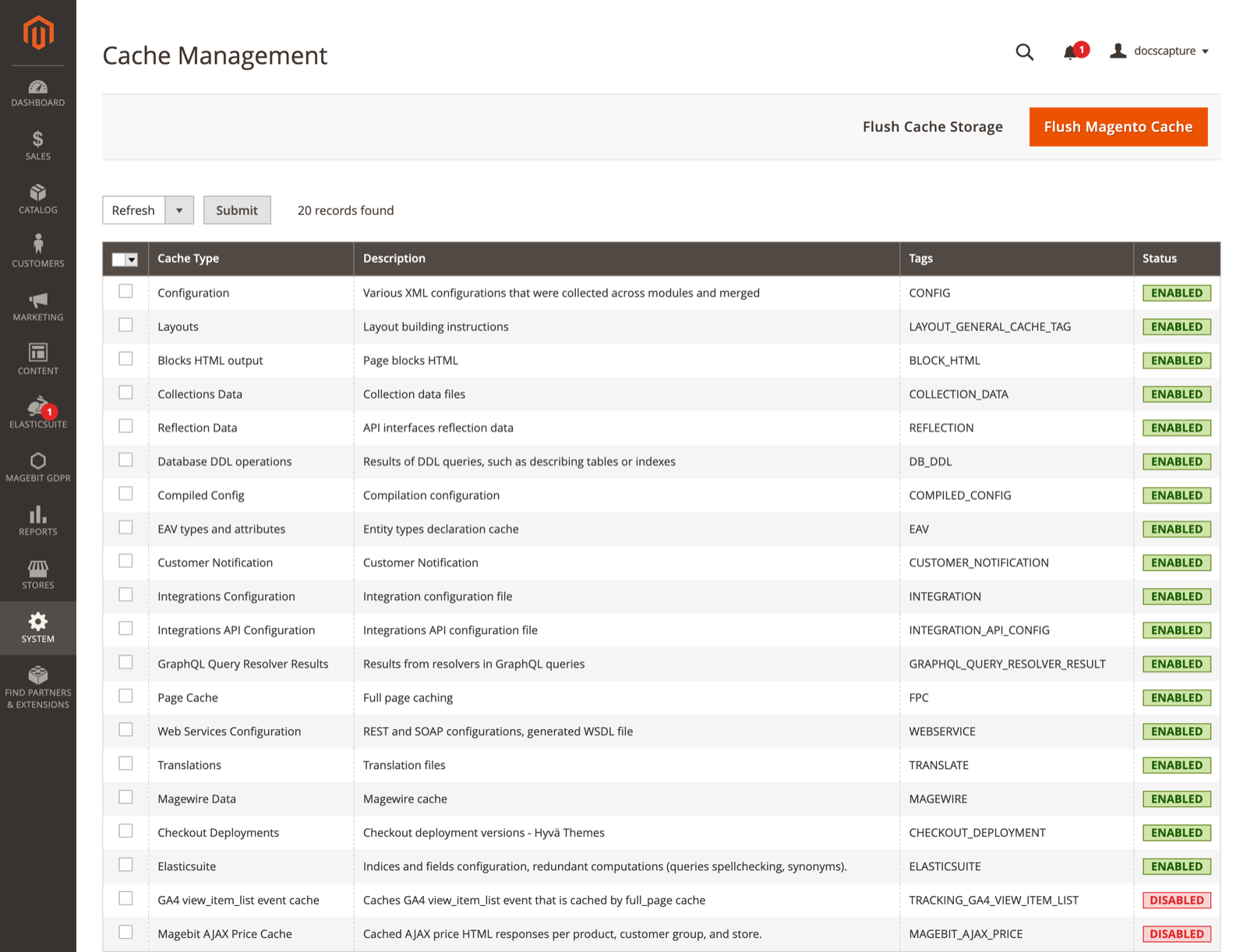
Enable the cache type
Magebit AJAX Price Cache arrives disabled, and the module does not check whether it is enabled before using it. While it is off, every AJAX price request re-renders the price block from scratch, so the feature works but costs far more per request than it should. Enable it in System > Cache Management before measuring anything.
Extension Configuration
Two groups and three fields. Both switches are off by default, so a fresh install changes no behaviour. Every field is available at default, website, and store view scope.
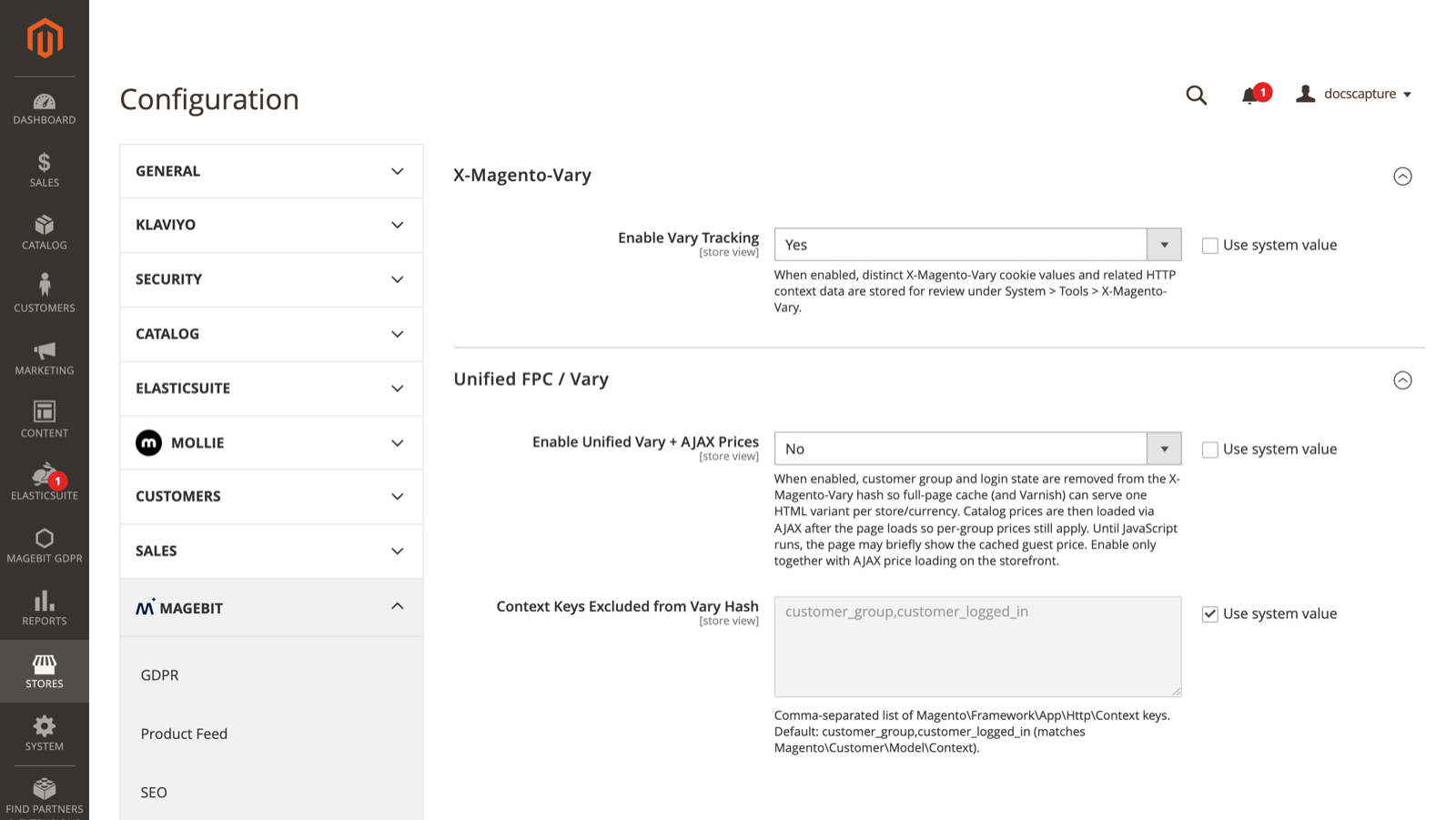
X-Magento-Vary
| Field | Default | Description |
|---|---|---|
| Enable Vary Tracking | No | Stores each distinct X-Magento-Vary cookie value and the related HTTP context data for review under System > Tools > X-Magento-Vary. |
Unified FPC / Vary
| Field | Default | Description |
|---|---|---|
| Enable Unified Vary + AJAX Prices | No | Removes customer group and login state from the vary hash so full page cache can serve one HTML variant per store and currency, and loads catalog prices over AJAX afterwards so per-group prices still apply. |
| Context Keys Excluded from Vary Hash | customer_group,customer_logged_in | Comma-separated Magento\Framework\App\Http\Context keys to drop from the hash. The default matches Magento\Customer\Model\Context. |
Flush the cache after changing either field
Both fields change how the vary hash is computed, so every existing full page cache entry becomes stale the moment one is saved. Flush the full page cache and purge Varnish after any change, in both directions. Until you do, what the storefront serves reflects the previous setting.
WARNING
Clearing Context Keys Excluded from Vary Hash does not switch exclusions off. A blank value falls back to customer_group,customer_logged_in, so unified vary cannot be run with an empty exclusion list.
Unified vary and AJAX prices
With Enable Unified Vary + AJAX Prices set to Yes, a catalog page is served in this order.
- On the five page types listed below, the customer session reports group
0, so the HTML written into the cache always carries guest prices. - Each
final_pricerender is wrapped in a placeholder element carrying the product id, with a shimmer class around the guest price. customer_groupandcustomer_logged_inare removed from the HTTP context before the vary hash is computed, so every group shares one cache entry.- Once the page has loaded,
js/ajax-prices.jscollects the wrapped product ids and posts them to/mp/ajax/prices. The controller re-renders each price under the shopper's real customer group and returns the HTML plus apriceDatapayload. - The script swaps the placeholder content for the returned HTML and dispatches
update-prices-{productId}, andupdate-option-prices-{productId}for configurable products, so the theme's price components pick up the corrected values.
Between steps 1 and 5 the shopper sees the cached guest price. On a store where a customer group has its own prices, that flash is visible.
Guest group forcing applies to these full action names and no others:
catalog_category_viewcatalog_product_viewcatalogsearch_result_indexcms_index_indexcms_page_view
Layered navigation price slider
ElasticSuite renders the layered navigation price slider bounds into the cached HTML, so a unified cache entry carries guest bounds. A second endpoint, /mp/ajax/priceFilter, rebuilds the slider config under the real customer group and returns only the numeric fields (minValue, maxValue, currentValue, intervals, adaptiveIntervals, showAdaptiveSlider, rate, step).
The loader script for this endpoint publishes window.magebitPriceFilterHook(instance, options) and waits to be called. Nothing invokes it from this module. The call site is the patched slider-filter-js.phtml in the Venta ElasticSuite integration, so on a store without that template the slider keeps its cached guest bounds.
Cache correctness limits
Unified vary trades cache granularity for hit rate. These are the cases where the trade is incomplete or wrong.
- Price sorting and price filtering opt out per request - On category and search pages, a request carrying
product_list_order=priceor a non-emptypriceparameter gets the original customer-specific vary hash, and guest group forcing is skipped. Those page variants stay cached per customer group. - That detection reads the query string only - A toolbar sort persisted in a cookie with no matching URL parameter is not detected, so a price-sorted listing can still be cached under a unified hash.
- Only the five action names above force the guest group - Any other page that renders catalog prices, a custom route or a controller from another module, renders real customer-group prices while the vary hash is already unified. That combination poisons the shared cache entry.
- Only
final_priceis wrapped - Tier price, special price, MSRP, and prices rendered outsideMagento\Framework\Pricing\Renderare left as the cached guest values and are never corrected by AJAX. - The AJAX price cache lives for 24 hours - It is invalidated by the
MAGEBIT_AJAX_PRICEtag plus the per-product cache tag. Nothing ties it to customer group changes, tax rules, catalog price rules, or currency rates, so those changes are not guaranteed to clear cached AJAX prices before the entry expires. - The vary cookie disappears entirely on a simple store - If removing the excluded keys leaves the context empty, no
X-Magento-Varyvalue is set at all. On a single-store site whose context holds onlycustomer_groupandcustomer_logged_in, that is the normal outcome rather than an edge case: with unified vary on, even a logged-in customer gets no vary cookie. This is what makes one cache entry serve every group, but it also means the vary hash stops being a usable diagnostic, and nothing is recorded in the tracking grid (see below).
X-Magento-Vary grid
With Enable Vary Tracking on, each new vary hash is written to magebit_performance_vary_record and listed under System > Tools > X-Magento-Vary. The grid shows the hash, the full context JSON, and, for rows where unified vary was applied, the hash before unification, the removed key/value pairs, and the context that remained. Rows can be filtered, and the only mass action is delete.
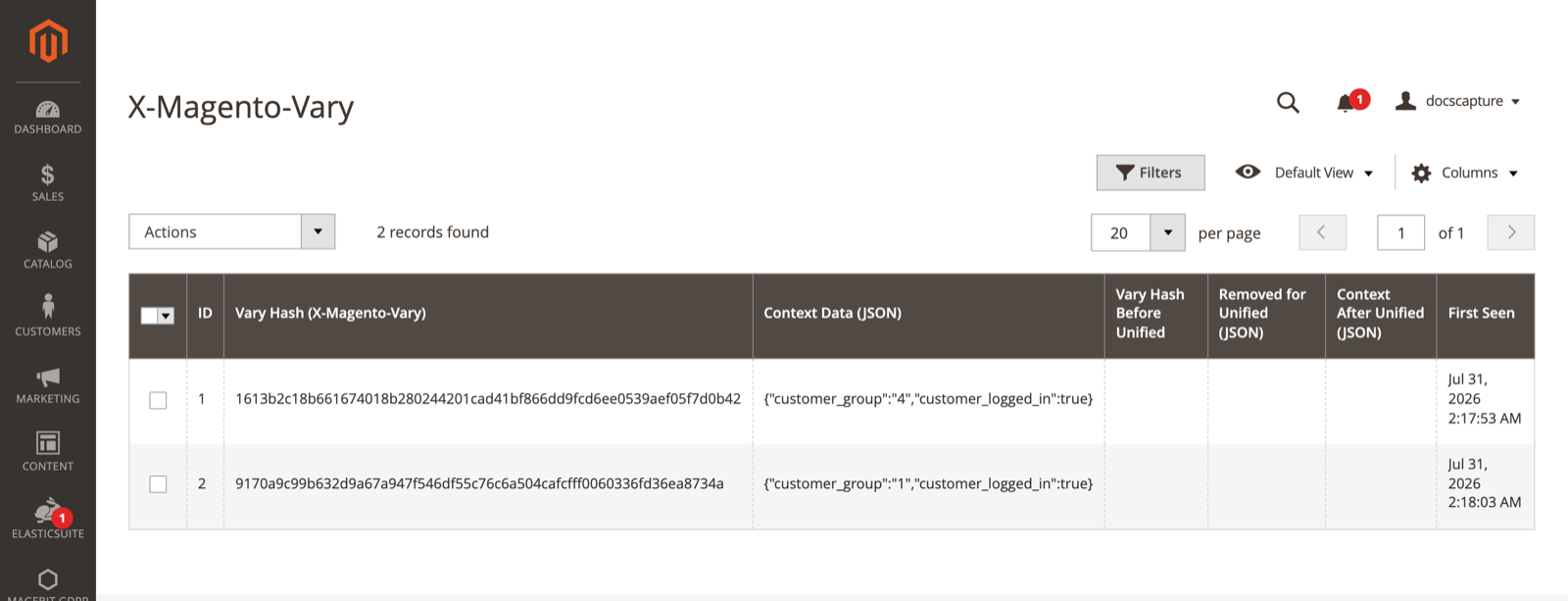
Each row pairs a hash with the context that produced it, so two customer groups browsing the same store produce two distinct hashes from the same pair of context keys.
Three limits apply to the recording:
- It is not storefront-only - The gate is that the area is not
adminhtml, so cron, REST, SOAP, and GraphQL requests also write rows. - The table has no cleanup - There is no cron job, CLI command, row cap, or retention setting. Deleting rows from the grid is the only way to prune it, which makes this a diagnostic tool rather than something to leave on in production.
- A row needs a non-empty HTTP context - The hash is derived from
Magento\Framework\App\Http\Context. On a single-store site a plain guest request often carries no context at all, so no hash exists and no row is written. Rows start appearing once something populates the context, typically a customer logging in. - Turning unified vary on can stop the recording - The recording happens after the excluded keys are removed. If nothing is left, the hash is
nulland no row is written, so on a store whose context holds only the two excluded keys the grid stays empty while unified vary is on, and the four unified columns never populate. Use tracking with unified vary off to survey what is fragmenting the cache, then turn unified vary on.
Developer notes
Endpoints
Both endpoints are POST only, validate the form key, and return 403 with {"message":"Feature disabled."} when unified vary is off. Neither is a general-purpose price API.
| Endpoint | Parameters | Returns |
|---|---|---|
POST /mp/ajax/prices | form_key, product_ids as a JSON array or comma-separated list, capped at 100 ids | {"prices":{"<id>":{"html":…,"priceData":…,"optionPrices":…}}}. optionPrices is present for configurables only. |
POST /mp/ajax/priceFilter | form_key, category_id, filter_params as a JSON object | {"config":{…}}, or {"config":null} when the category is unknown or the layer has no price filter |
The frontend route front name is mp. The admin front name for the same route id is magebit_performance.
More than 100 ids in one batch returns 400, not a partial result.
Price wrapper opt-out
A wrapper carrying data-price-loader-event is left alone by the script: the events still fire but the HTML is not replaced. The module never sets this attribute itself. It exists so a theme template can keep its own markup and react to the event instead.
Styling
The module ships no CSS. The shimmer and inner-wrapper classes come from the theme's compiled Tailwind output, and the price loader template emits a hidden element so the Tailwind build does not purge them.
Extension points
| Type | Target | Class |
|---|---|---|
| Plugin, global | Magento\Framework\App\Http\Context::getVaryString | Plugin\Http\HttpContextVaryPlugin |
| Plugin, global | Magento\Framework\Pricing\Render::render | Plugin\Pricing\RenderPlugin |
| Plugin, frontend | Magento\Customer\Model\Session::getCustomerGroupId | Plugin\Pricing\GuestGroupPlugin |
The unified hash is computed as sha256(json_encode(ksort(filtered context)) . '|' . cryptKey). It re-implements the core hashing rather than delegating to it, so a future change in Magento's own hashing will not carry over.
Troubleshooting
Prices stay at the guest value
- Confirm Enable Unified Vary + AJAX Prices is Yes for the store view being tested. With it off,
/mp/ajax/pricesanswers403and no prices are wrapped. - Check the browser console for a failed POST to
/mp/ajax/prices. A400with an invalid form key message means the cached page carried a stale form key, which a cache flush clears. - Confirm the price you are watching is the product's
final_price. Tier prices, MSRP, and hand-written price templates are never wrapped. - Check whether the page is one of the five action names that force the guest group. On any other page the cached HTML already holds real group prices and there is nothing to correct.
A customer sees another group's price
This is the cache poisoning case in Cache correctness limits. A page outside the five listed action names rendered real customer-group prices, and that HTML was then stored under the unified hash and served to everyone.
- Flush the full page cache and purge Varnish to clear the poisoned entry.
- Audit every route that renders catalog prices: custom controllers, brand or landing pages, widgets on non-listed page types. Anything not in the five listed action names needs either its own vary handling or its prices removed from the cached HTML.
- As a check, load the page as two customers in different groups with the cache cold, and compare the first response for each.
Prices are stale after a price rule change
The AJAX price cache holds responses for 24 hours and is only invalidated by its own tag and the per-product tag. A catalog price rule, tax rule, currency rate, or customer group change does not clear it.
Flush Magebit AJAX Price Cache in System > Cache Management after any of those changes. On a store where prices change on a schedule, flush it as part of that job.
The X-Magento-Vary menu item is missing
The grid is guarded by the Magebit_PerformanceOptimizations::vary ACL resource. Add it to the admin role under System > Permissions > User Roles. The configuration section is guarded separately by Magebit_PerformanceOptimizations::config.
The price slider shows guest bounds
The slider needs the patched slider-filter-js.phtml from the Venta ElasticSuite integration to call window.magebitPriceFilterHook. Confirm that template is in use in the active theme. Without it the /mp/ajax/priceFilter endpoint is never called.
The X-Magento-Vary grid is empty
- Confirm Enable Vary Tracking is Yes for the scope being exercised.
- Browse as a signed-in customer - A guest on a single-store site usually has an empty HTTP context, so there is no hash to record. Signing in adds
customer_groupandcustomer_logged_inand produces the first row. - Turn Enable Unified Vary + AJAX Prices off while surveying - With it on, the excluded keys are removed before the row is written, so a store whose context holds only those keys records nothing at all.
- Rows are written the first time a hash is seen. A hash already in the table produces no new row, so switch customer group or flush the cache to generate a new one.
- Requests served from the full page cache never reach PHP, so they record nothing. Flush the cache, or use a URL that is not yet cached.