

Venta PayPal Express Setup
This guide covers installing the extension and configuring core PayPal so the Venta buttons render and complete an order. For a summary of what the extension does, see the Overview.
Prerequisites
- Magento 2 with the Venta theme, and core
Magento_Paypalpresent. - A PayPal Business account with NVP/SOAP signature credentials (API username, password, and signature). This method uses signature credentials, not a REST client ID and secret.
- A PayPal account currency compatible with the store currency.
Setup at a glance
- Install the module and enable it together with
Magento_Paypal. - In core PayPal, activate PayPal Express Checkout and the in-context experience, then enter the signature credentials and merchant ID.
- Match sandbox or live mode to the credentials you entered.
- Turn on Transfer Cart Line Items and Transfer Shipping Options (required for one-click).
- Check the setup-status panel under
Magebit > PayPal Express, then enable One-Click Express Checkout if you want it.
Installation
Installation Command:
composer require magebitcom/magento2-venta-theme-paypalPost-Installation Steps:
bin/magento module:enable Magento_Paypal Magebit_VentaPayPal
bin/magento setup:upgrade
bin/magento cache:flush
Magento_Paypal must be enabled
The module depends on core Magento_Paypal. If Magento_Paypal is disabled while Magebit_VentaPayPal (or Hyva_CheckoutPayPal) is enabled, every storefront page fails with Cannot instantiate interface Magento\Paypal\Model\Payflow\Service\Response\Handler\HandlerInterface, because the core PayPal di.xml that defines this preference is never loaded. Enabling the module does not auto-enable its dependency, so enable Magento_Paypal in the same command.
Core PayPal configuration
All settings below live under core PayPal, at Stores > Configuration > Sales > Payment Methods > Other PayPal Payment Solutions > PayPal Express Checkout. They are the requirements for the Venta buttons to render and complete an order.
The same fields appear in several places
The credential and merchant fields repeat across a few config groups because Magento defines one PayPal section per merchant country (payment_us, payment_gb, payment_de, payment_other, and so on), and the PaymentServicesPaypal and Braintree modules add their own PayPal-branded groups on top. Magento only shows the section that matches the Merchant Country set at paypal/general/merchant_country. Fill in the group under the section for your merchant country; the identical-looking fields in the other sections belong to countries you are not using. This is core Magento behaviour, not part of the Venta extension.
Activate the method and in-context buttons
Configuration options
| # | Field | Description |
|---|---|---|
| 1 | Enable this Solution | Turns the PayPal Express Checkout method on. Required. |
| 2 | Enable In-Context Checkout Experience | Required for the smart buttons. With it off, the PayPal JS SDK loads without the buttons component and the buttons fail with paypal.Buttons is not a function. |
Config paths:
payment/paypal_express/activepayment/paypal_express/in_context
API credentials (signature)
PayPal Express uses NVP/SOAP signature credentials, not a REST client ID and secret.
Configuration options
| # | Field | Description |
|---|---|---|
| 1 | API Username | Signature credential from the PayPal account. Stored encrypted. |
| 2 | API Password | Signature credential from the PayPal account. Stored encrypted. |
| 3 | API Signature | Signature credential from the PayPal account. Stored encrypted. |
| 4 | API Authentication Methods | Set to 0 for signature auth. |
Config paths:
paypal/wpp/api_usernamepaypal/wpp/api_passwordpaypal/wpp/api_signaturepaypal/wpp/api_authentication
Do not set the credentials with config:set
The three credential paths are stored encrypted. Magento decrypts them on read, so they must be saved as the target environment's own ciphertext. bin/magento config:set stores plaintext, which Magento then tries to decrypt, producing #10002 Username/Password is incorrect. Enter them in the admin form, which encrypts with the local crypt key, or write them with the encryptor on the target environment. The ciphertext cannot be copied between environments, because each has its own crypt key.
Merchant ID
- Merchant Account ID - The PayPal Account ID of the same account that owns the API credentials. It is used as the smart button
merchant-id. A stale or mismatched value makes the popup open and then close with an initialization error. Config path:payment/paypal_express/merchant_id.
Sandbox or live
- Sandbox Mode -
1for sandbox,0for live. This selects both the JS SDK client ID and the API endpoint, so it must match the type of credentials you entered. Sandbox credentials with sandbox mode off resolve the live endpoint and fail with#10002. Config path:paypal/wpp/sandbox_flag.
Business account must be empty
WARNING
Leave Business Account (paypal/general/business_account) empty for first-party signature auth. If it holds your own account email, Magento sends a SUBJECT (third-party) parameter on GetExpressCheckoutDetails and DoExpressCheckoutPayment, which fails with #10002 Username/Password is incorrect.
Account currency
The PayPal account currency must suit the store currency. A USD sandbox account on a EUR store can hit currency or capture errors at order placement. Confirm the account currency before testing.
Preselected default payment method
If another module preselects a default payment method on the quote (for example Mollie's default selected method, or checkmo), the core cart PayPal Express flow resolves the API endpoint from the quote's payment method. For a non paypal_express method the sandbox flag is not read, so the flow calls the live endpoint with sandbox credentials and fails with #10002. The module ships a plugin that forces paypal_express on the quote during the core PayPal express controllers, so the cart and mini-cart buttons keep working alongside a preselected default. This needs no configuration.
Shipping options in the PayPal popup
Core PayPal can hand the store's shipping methods to PayPal so the buyer picks one inside the popup. Turn on both Transfer Cart Line Items (payment/paypal_express/line_items_enabled) and Transfer Shipping Options (payment/paypal_express/transfer_shipping_options) to enable it. This is required for the one-click flow below, where the buyer never reaches the store's own shipping step.
The Venta extension corrects two problems in how core sends these options:
- The buyer now sees the readable method label (for example
Free Shipping - Free) instead of the internal rate code (freeshipping_freeshipping). Core sends the code as the displayed name to round-trip the selection; the extension swaps this so the label is shown while the real code still rides along and resolves on return. - The empty
no_rate/$0.00placeholder that core adds as the default when the buyer has not yet chosen a method is dropped whenever real rates exist, so PayPal no longer pre-selects a non-existent shipping option.
Magebit PayPal Express settings
These settings live at Stores > Configuration > Magebit > PayPal Express. The section opens with a setup-status panel that reads the current configuration and shows a badge for each prerequisite (core module, method active, in-context, credentials, merchant country, shipping transfer), so you can see at a glance what still needs configuring.
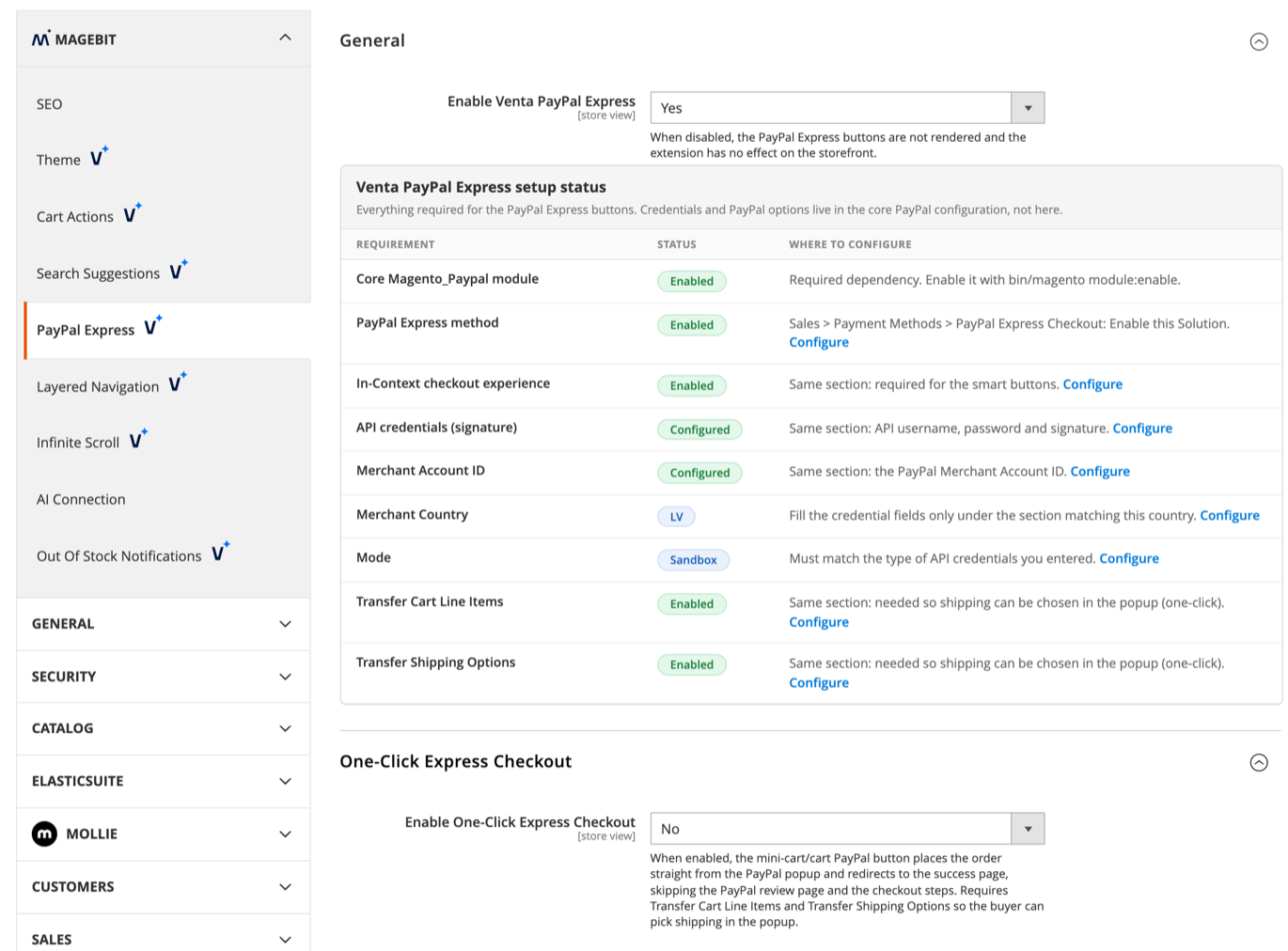
Configuration options
| # | Field | Description |
|---|---|---|
| 1 | Enable Venta PayPal Express | Master switch for the extension. On by default. When off, the Venta PayPal buttons do not render and the extension is inert. |
| 2 | Enable One-Click Express Checkout | Off by default. The mini-cart and cart PayPal button place the order straight from the PayPal popup and send the buyer to the success page, skipping the review page and the checkout steps. Requires Transfer Cart Line Items and Transfer Shipping Options so the buyer can pick shipping in the popup. |
Config paths:
magebit_paypal_express/general/enabledmagebit_paypal_express/one_click/enabled
Buyer phone number
The order does not require a phone to be placed, and a phone is captured only on a best-effort basis:
- For logged-in buyers, their saved phone (default billing address) is reused automatically.
- For guests, the order may have no phone. PayPal's legacy Express (NVP) API this store uses has no way to add a phone field to the popup, and the old Contact Telephone Number account setting that once returned one has been deprecated and removed from newer PayPal accounts. Capturing a guest phone would require migrating to PayPal's REST v2 API.
Troubleshooting
Browser extensions
Ad and tracker blockers block the PayPal JS SDK. A blocked SDK shows net::ERR_BLOCKED_BY_CLIENT in the console and leaves paypal.Buttons undefined. Test in a window with extensions disabled before treating this as a configuration problem.